


1. Import
To import data into the current project, choose one of the following steps:
- Click the 'Import' button. Alternatively, select the type of import from the dropdown menu on the left.
Open the import window to select different types of data for import.
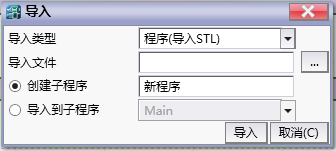
图1 import winow
| Data Type | Description |
|---|---|
| Project | Import data from another project, which will open the project import wizard for subsequent operations. |
| Program (Import STL) | Import program data, this program can only be described using STL. |
| Function Block | Import Function Block. |
| Software Component Table | Import Software Component Manager Table. |
| Initialization Table | Import software component initialization table. |
| Monitoring Table | Import Software Component Monitoring Table. |
| Timing diagram | The timing diagram of the numerical variation curve of the imported software component. |
| Graphics | Import CAD graphics. |
อ่านเพิ่มเติม
อุปกรณ์ที่ใช้กับคู่มือนี้
2 รายการ

