


1. download
To download the current project to the PLC, please follow these steps:
Ensure the normal operation of the communication system from PLC to PC.
Open the 'Download' button or the shortcut key combination of Ctrl+D.
You can select the data to download from the "Download Data" combo box as needed.
You can personalize the download according to your needs in the "Options" combo box.
Ensure that communication is currently possible* Suggest clicking the 'Auto Detection' button to match communication schemes with just one click*
Click 'Download' to start the download process.
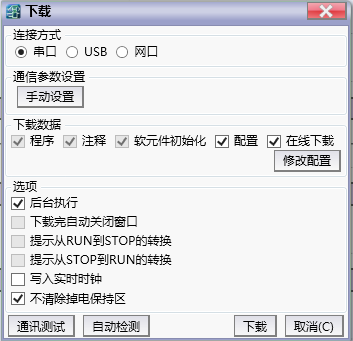
图1 Download window
1.1. Solution for downloading multiple PLCs simultaneously#
Please refer to Advanced Download Tool。
อ่านเพิ่มเติม
อุปกรณ์ที่ใช้กับคู่มือนี้
2 รายการ

