


1. Read PLC memory and create initialization table
To read data from the PLC memory and create an initialization table, follow these steps:
- In the "Software Component Initialization" window, click on the icon.

图1 inmage
- Pop up the settings window, set the name of the generated table, and set the memory range for reading.
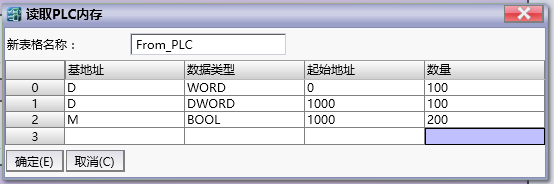
图2 set window
Single or multiple segments of memory can be set to read.
| Segment attribute | Description |
|---|---|
| Base address | The basic address of a software component, which divides its functions |
| Data Type | The data type of the initialization item read |
| Starting address | The address of the first software component in this section |
| Quantity | Number of initialization items read |
Attention:
Quantity refers to the number of items in the table, not the number of registers. Because there is a situation where a value occupies multiple registers.
For example, in the segment starting from D1000 in the second setting, each double word occupies two D registers, namely D1000, D1002, D1004..., until D1198.
- Click OK to establish communication with the PLC, read the memory to generate the initialization table.
อ่านเพิ่มเติม
อุปกรณ์ที่ใช้กับคู่มือนี้
2 รายการ

