


1. Batch Add to Software Component Manager
Click on the Software Component Manager toolbar, button,add in bulk.
The following is a description of each attribute.
| Attribute | Description |
|---|---|
| Type | Register type of software component. For example, bit register M, word register D, etc. |
| Address | Register address of the first software component. For example, 100 for M100 and 200 for D200. |
| Quantity | The quantity added in bulk. |
| Interval | The address interval between the first soft component and the next one. For example, when the interval is 2, it is D0, D2, D4, and when the interval is 3, it is D0, D3, D6. |
| Data Type | The added software component defines its data type. |
| Annotation expression | Generate annotations for these software components according to certain rules. |
| Alias | Generate aliases for these software components using a uniform name (+serial number) rule. |
1.1. Annotation expression#
Text can be filled in so that all annotations for added software components are in this text.
You can add integer variables such as $+integers (e.g. $1, $2, $3...) in the middle and fill in the corresponding calculation formula below. Ultimately, an integer will be calculated independently for each software component and integrated into the annotation text.
The calculation formula supports the variable 'id' to indicate the addition of a sequence number (starting from 0), and supports operations such as'+',' - ',' * ', and'/'.
Here is an example of usage:
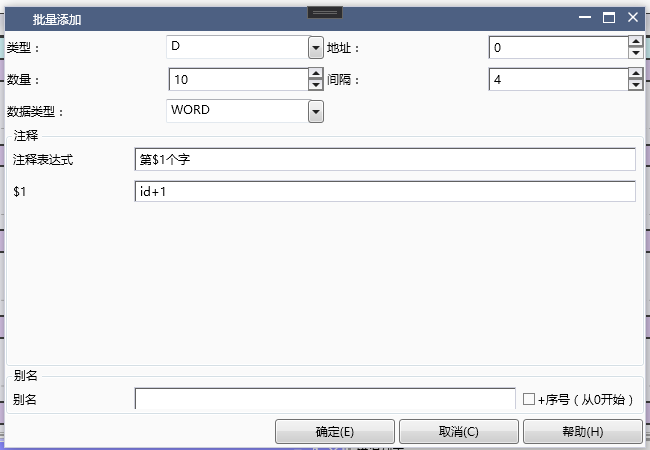
图1 Annotation Expression and Variable Calculation Formula
After confirmation, annotation content will be automatically added to the current software component.
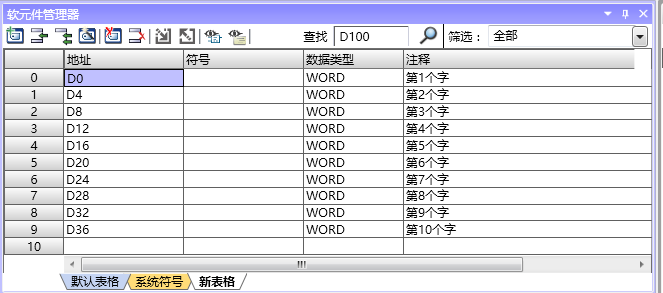
图2 Add Content
อ่านเพิ่มเติม

