


1. How to enter an address in LAD
When you enter an instruction in LAD, the parameters are initially represented by a question mark, such as (&# 63;&# 63;&# 46;&# 63;) or (&# 63;&# 63;&# 63;&# 63;).
The question mark indicates that the parameter has not been assigned a value. You can specify a constant or absolute value, sign or variable address for the parameter of an input element, or assign a value later. If any parameters are not assigned, the program will not compile correctly.
1.1. Assign address#
To assign an absolute address (such as X000), simply select the address area (if not selected) and enter the desired value.
The alternative list below will assist you in completing parameter input.
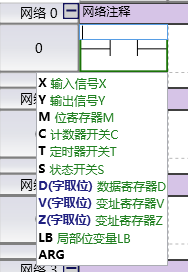
图1 input parameter
To allocate a local variable (such as LBTemp), simply select the address area (if not selected) and enter the name.
To specify a symbol address (using global symbols or program parameters such as INPUT1), the following simple steps must be performed:
Type the symbol or variable name in the address area of the instruction.
For global symbols, use a symbol table to assign symbol names to memory addresses (if symbols have not been defined).
Note: You do not need to define symbols in advance to use them in the program. When entering a new symbol name, SamSoar2022 will automatically input it into the symbol table for you to define the memory address in the future.
- For program parameters of subroutines and interrupt programs, use the subroutine parameter table. Enter the variable name in the "Name" column.
Note: You do not need to enter addresses for program parameters, as the compiler will automatically allocate temporary storage.
1.2. Regarding the alternative list#
Before entering parameters, the candidate list will list all supported register groups.
During the parameter input process, the candidate list will match all software components that meet one of the following requirements.
Enter the content as the address prefix.
Match strings with input content as symbols.
อ่านเพิ่มเติม

