


1. How to input a modbus table
1.1. Basic establishment steps#
- Right click on the "Project" ->"Modbus Table" folder in the project management window, click on "New Modbus Table", and then a new dialog box will pop up.。
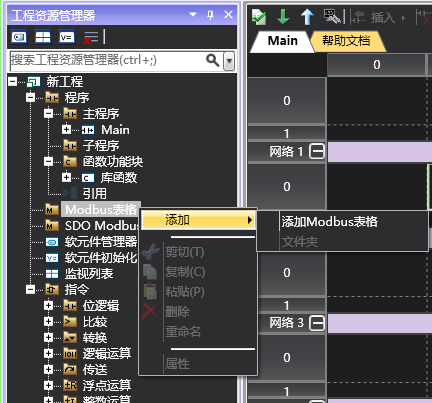
图1 new Modbus table
- Enter the table name (here is "Modbus Master Table"), and then click the "OK" button. You can add and edit this table now. The upper menu bar of the interface provides editing functions for Modbus tables.。

图2 right side menu
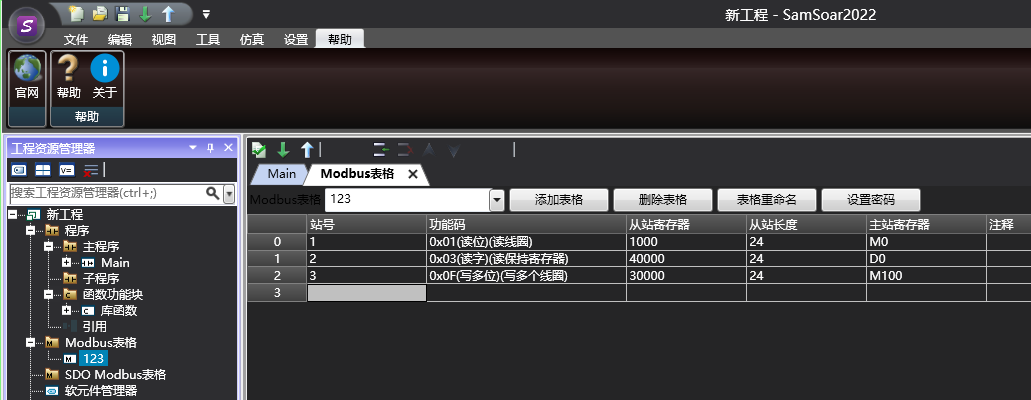
图3 Modbus edit table
อ่านเพิ่มเติม
อุปกรณ์ที่ใช้กับคู่มือนี้
2 รายการ

