


1. How to Copy Data
ในหน้านี้5 หัวข้อ
se one of the following methods to complete cutting, copying, and pasting operations:
In the "Edit" menu bar, click on "Cut", "Copy", and "Paste".
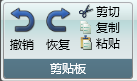
图1 menu bar button
- Use shortcut keys such as Ctrl+X for cutting, Ctrl+C for copying, and Ctrl+V for pasting.
Explanation
When pasting, clone a new copy from the data of the clipboard and add it to the currently selected location.
1.1. Copy program content#
In the program editor, select the data to be copied and copy it.
In the program editor, select the paste location and paste it* The original data will be overwritten*
You can paste data from one program into another program, or paste data from one project into another project.
Explanation
In the default or European style, the copied data must be continuous rectangular blocks that are in contact with each other.
In Japanese style, you can press Ctrl and click the mouse to select discontinuous data.
1.2. Copy one or more programs#
In the Engineering Resource Manager, select the program you want to copy and copy it.
In the Engineering Resource Manager, select the folder where you want to place the pasted data and paste it.
You can copy one or more folders, and the directory structure of the folders, as well as all internal data, will be stored in the clipboard.
1.3. Copy table content#
Select the data to be copied from the table and proceed with the copying process.
Select the location in the table where you want to place the pasted data and paste it* The original data will be overwritten*
Explanation
It is not recommended to paste data into inappropriate situations. For example, pasting software component annotations into data types. This will cause the paste to be invalid.
1.4. Implementing data transfer (replication) between projects#
To copy content between two SamSoar2022 software, please follow these steps:
Open two separate software.
In the first software, select the item you want to copy and copy it.
In the second software, select the location where you want to place it and paste it.
1.5. Implementing data transfer (replication) between projects#
To copy content between different projects within the same software, please follow these steps:
Open a software.
Open a project, select the project you want to copy content from, and copy it.
Close the currently open project.
Open another project, select the location to place it, and paste it.
อ่านเพิ่มเติม

