


Usb update PLC program

SK series touch screen support using U disk update Samkoon PLC program
How to update Samkoon PLC program using usb flash drive
1. Compile Samkoon PLC U disk update file
Official website download the latest Samkoon PLC software, design the completion of the PLC program, click the following button, generate U disk update PLC required files
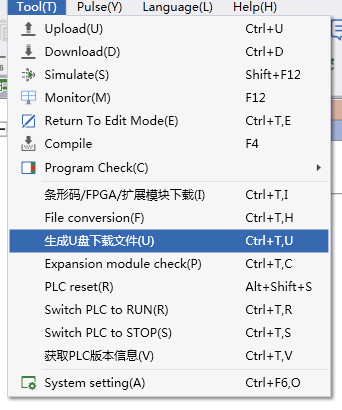
Generate the following U disk update file, copy to U disk root directory

2. Add U disk to update Samkoon PLC function button
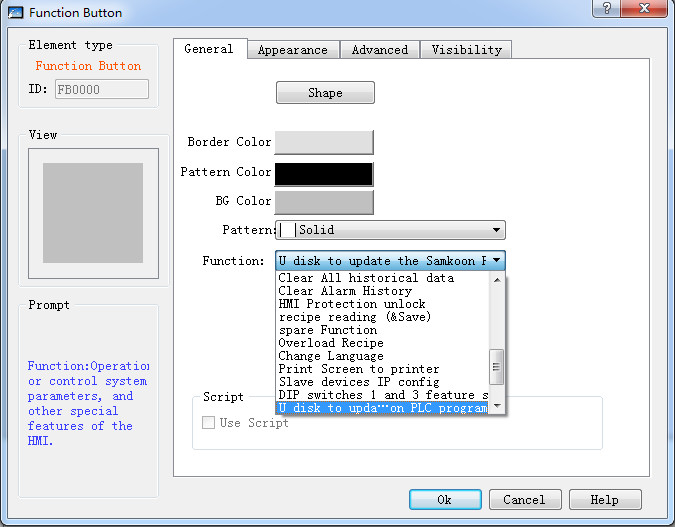
3. Update Samkoon PLC program
Click the button on the touch screen and the interface as shown in the figure below appears
a) Put the PLC file into the root directory of U disk and insert it into the touch screen
b) Select the corresponding serial port and set the corresponding communication baud rate
c) Click the communication test to check whether the current communication parameters can communicate with the PLC normally. When normal, enter the next step of operation, and automatically switch the communication parameters if wrong. When communication succeeds, enter the next step of operation
d) Click download, enter the update Samkoon PLC program, observe the message prompt, update failure, according to the message prompt information to determine the cause of update failure, fix the cause of failure, need to click a restore factory operation, restore factory success from the first step to start again
e) When the update is complete, close the window
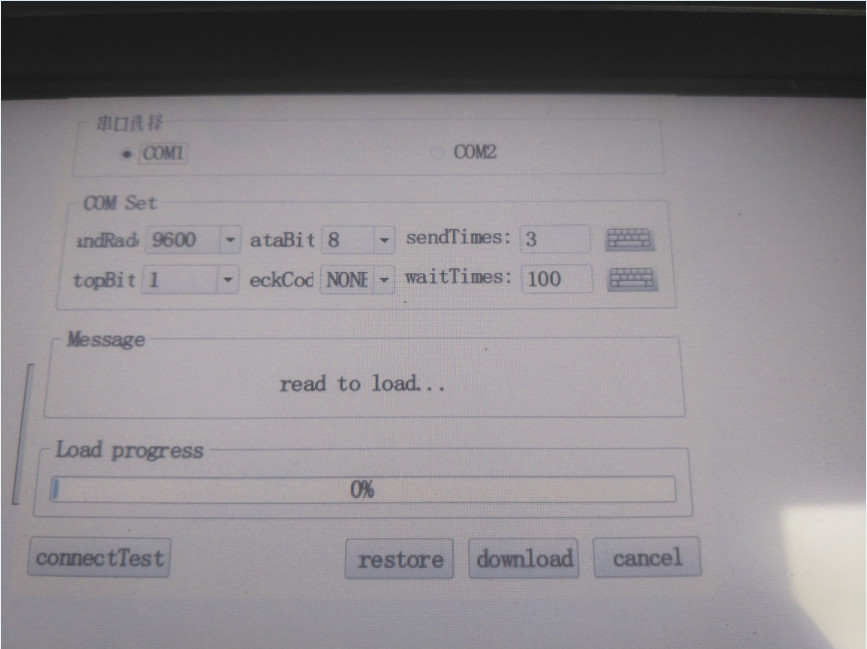
COM choose:
The serial port updates the samkoon PLC program, and temporarily only supports the serial port, which selects the connection between the touch screen and the PLC.
COM set:
Set touch screen and samkoon PLC communication port rate
Message:
Prompts for various information that appears in the update process
Load progress:
Prompt update of PLC program schedule
Connect Test:
Test touch screen and samkoon PLC can communicate normally, and the communication test will be able to perform normal update operation
restore:
When the error occurs in the update process, the advanced row is required to recover the factory and update the operation
download:
Update the samkoon PLC program
injection:
Ensure that samkoon PLC updates the integrity of the files
Please consult whether Samkoon PLC software meets the requirements when there are problems in the update
อ่านเพิ่มเติม

