


Message Display
Message Display
functions similarly to the multi-state indicator, except that the
total states number of the message display control increases, which is up to
128. This control icon on the toolbar is ,
click it to bring up a dialog box as shown in Figure 4-66:
,
click it to bring up a dialog box as shown in Figure 4-66:
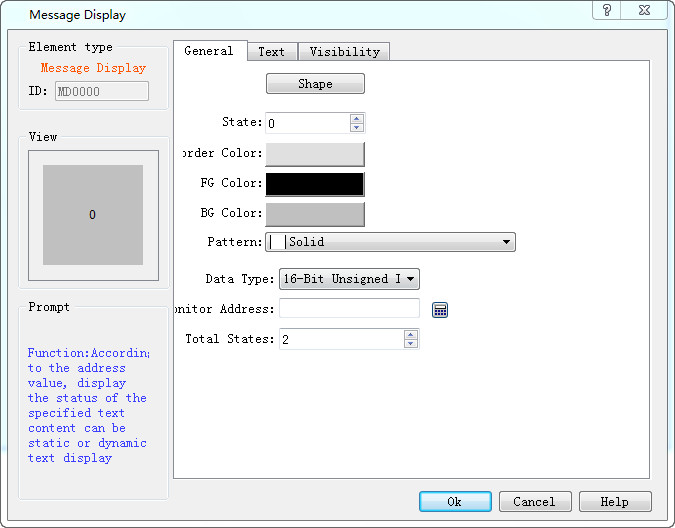
Figure 4-66 Message Display General page
The Text page of Message Display is shown in Figure 4-67:
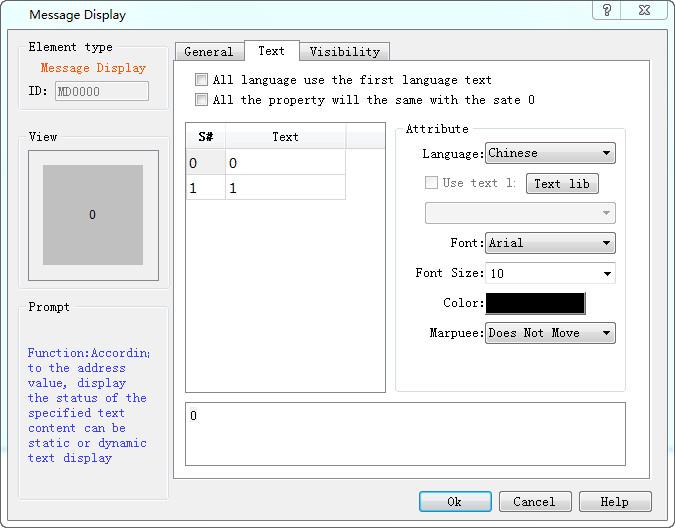
Figure 4-67 Text page of Message Display
The language, font, font size and color settings can refer to those of the multi-state indicator control.
l Cursors: This item has three options-- Not move, Left and Right.
l Not move: The current state of text is static.
l Left: Text in the current state moves to the left at the speed (assumed to be n) set by user by n pixel value.
l Right: Text in the current state moves to the right at the speed (assumed to be n) set by user by n pixel value.

As for Property settings, you can refer to the attributes of "Multi-state indicator" control.