


MsgBord
Message Board: A control that user can
write on. The control icon on the toolbar is:  .
Click on this button to pop up the dialog box shown in Figure 4-121.
.
Click on this button to pop up the dialog box shown in Figure 4-121.
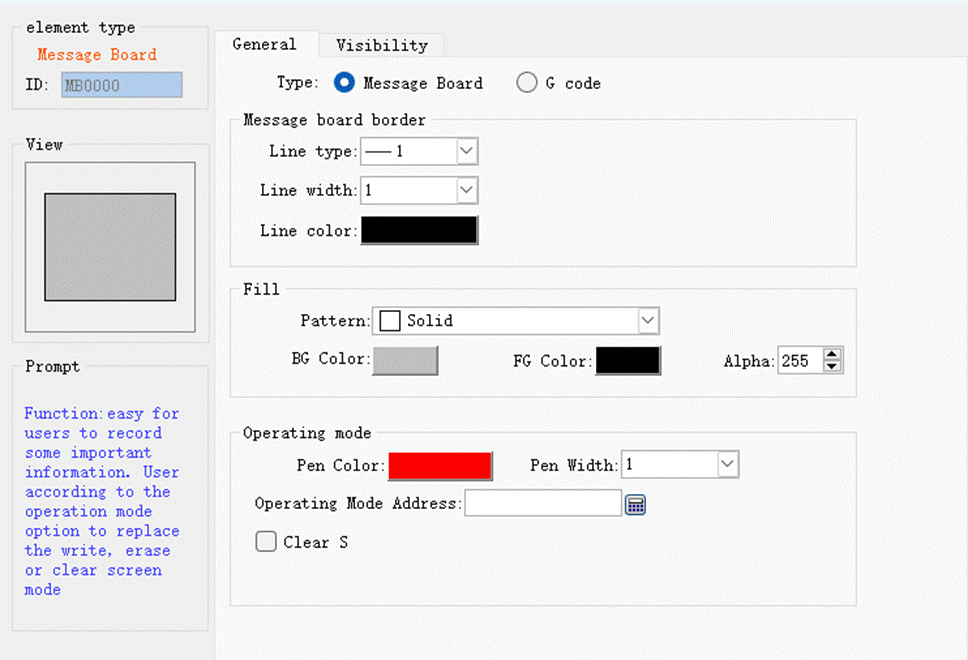
Figure 4-121 Message Board General Page dialog box
l Type: Message Board or G Code
l Line color: The color of the text written on the control
l Line width: The width of the line describing the font
Ø Operating mode:
Operating Mode Address: This address is a word address and is valid only when the address is equal to 0 or 1. An address value equal to 0 indicates a writing operation; an address value equal to 1 indicates an erasing operation.
The address is a word address occupying 3 consecutive addresses: the first address controls the operating mode, 0 for writing operations, 1 for erasing operations; the second address controls the line width; and the third address controls the RGB color of the brush.
Ø Clear Screen
Clear screen address: when the address value is equal to that set by the clear screen status (0 or 1), it will erase automatically all the contents written on the control
Refer to “Bit button” for the application of “Visibility” page.
อ่านเพิ่มเติม

