


1. Counting down CTD
1.1. Instruction Description#
The Down Count (CTD) instruction counts down from the current value each time the input energy flow transitions from closed to open. When the current value CVxxx is equal to 0, the counter bit (Cxxx) is turned on. The down counter continues to count down to the minimum value (16 bits -32768, 32-bit -2147483648) and stops counting. Performing a reset operation can reset the counter, that is, the counter bit (Cxxx) is set to 0, and the current value of the counter (CVxxx) is reset to the preset value (SV).
be careful:
To assign the instruction initialization parameter 'count target value' to the current counter value (CVxxx), the program needs to perform a reset counter (Cxxx) operation during runtime, regardless of whether the current counter is in a reset state, and the assignment operation needs to be completed before the reset operation.
Counter range: CVxxx=CV0 to CV255; Cxxx=C0 to C255.
| Counter Type | Counter Bit Number | Maximum Value | Counter Number |
|---|---|---|---|
| CTD | 16 bits | 32767 | C0-C199 |
| CTD | 32-bit | 2147483647 | C200 – C234 |
| CTD | 32-bit (high-speed) | 2147483647 | C235-C255 |
Note: Since each counter has a current value, do not set the same counter number to more than one counter (up and down counters with the same number access the same current value)
1.2. The valid operands of the instruction#
| Input/Output | Data Type | operand | Description |
|---|---|---|---|
| CV | 16 bit integer | CV | Counter |
| SV | 16 bit integer | D/CV/TV/AI/AO/K/H/V/Z/FD, bit composite word (X/Y/M/C/T/S), local variable (LW) | preset value |
1.3. Example#
Command table:
NETWORK 000
LD X000
CTD CV0 D0 // The counter starts counting down from the current value CV0, and the set value (SV) is D0
NETWORK 001
LD C0
OUT Y000
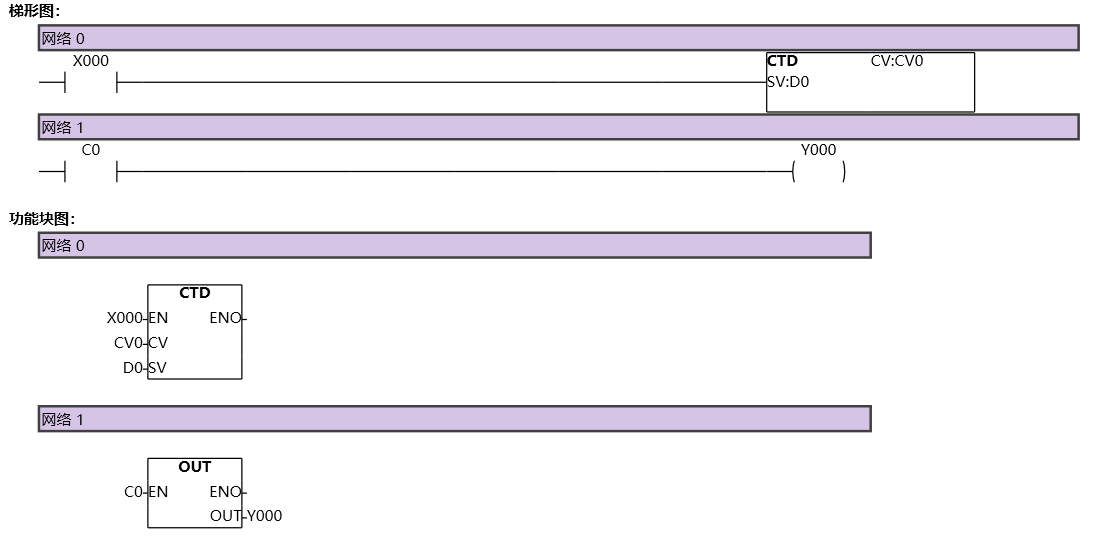
图1 CTD
อ่านเพิ่มเติม

