


1. Connect the delay timer TON
ในหน้านี้6 หัวข้อ
1.1. Instruction Description#
When the input terminal is turned on, the timer bit (Tx) is turned off, and the current value (TVx) starts timing from 0. When the current value (TVx) is greater than or equal to the preset time (SV), the timer bit (Tx) is turned on and the timer stops counting; When the input terminal is turned off, the delay timer will automatically reset, that is, the timer bit (Tx) will be OFF and the current value (TVx) will be 0. Tx=T0 to T255, TVx=TV0 to TV255.
TON, TONR, and TOF timers have three resolutions. The resolution is determined by the timer number shown in the following figure. Each current value is a multiple of the time base. For example, a count of 50 in a 10 millisecond timer represents 500 milliseconds.
| Timer number | Resolution | Maximum value |
|---|---|---|
| T0- T199 | 100ms | 3276.7 seconds |
| T200- T249 | 10ms | 327.67 seconds |
| T250-T255 | 1ms | 32.767 seconds |
1.1.1. Attention:#
TOF, TONR, and TON cannot share the same timer number. For example, there cannot be TON TV32 D0 and TOF TV32 D0.
You can use TON for single interval timing.
Performing a reset operation can reset the timer, that is, the timer position is 0, and the current value of the timer is set to 0.
1.1.2. Refresh method of timer:#
The basic series PLC has different refresh methods for timers of different resolutions, resulting in significant differences in usage methods. When using, please be sure to choose timers of different resolutions according to the usage scenario and requirements
(1)1ms timer: The 1ms timer is refreshed by the system every 1ms, regardless of the scanning cycle and program processing. It uses an interrupt refresh method. Therefore, when the scanning cycle is greater than 1ms, it may be refreshed multiple times in one cycle, and its current values (TVx) and (Tx) may not be consistent within one scanning cycle;
(2)10ms timer: The 10ms timer is automatically refreshed by the system at the beginning of each scanning cycle. Since it is only refreshed once every scanning cycle, the timer bit (Tx) and current value (TVx) remain consistent throughout a scanning cycle;
(3)100ms timer: The 100ms timer is refreshed only when the timer instruction is executed. Therefore, if the 100ms timer is activated and the timer instruction is not executed every scan cycle or executed multiple times within a scan cycle, it will cause timing misalignment. The 100ms timer is only used in programs where the timer instruction is executed once per scan cycle;
1.1.3. Example of correct use of timer::#
(1)1ms timer: When using the wrong method, the Y0 output with a width of one scan cycle can only be generated when the timer's refresh occurs between the normally closed contact of T250 and the normally open contact of T250, and this possibility is extremely small;

图1 1ms Timer * * Error * * # Usage

图2 1ms Timer * * right * * # Usage
(2)10ms timer: When using the wrong method, Y0 output will never be generated because when the 10ms timer is timed, it refreshes at the beginning of each scan cycle. For example, when T200 is set, but when the timer instruction is executed, the timer will be reset (both the current value and the timer bit are set to 0); When the normally open contact T200 is activated, T200 will always be OFF and Y0 will also be OFF, meaning it will never be set to ON;

图3 10ms timer * * error**usage

图4 10ms timer * * right**usage
(3)100ms timer: Since the 100ms timer refreshes when executing instructions, when the timer T0 reaches the set value, it will definitely generate a Y0 output;

图5 100ms timer * * error**usage

图6 100ms timer * * right**usage
1.2. The valid operands of the instruction#
| Input/Output | Data Type | operand | Description |
|---|---|---|---|
| TV | 16 bit integer | TV | Timer |
| SV | 16 bit unsigned integer | D/CV/TV/AI/AO/K/H/V/Z/FD, bit composite word (X/Y/M/C/T/S), local variable (LW) | preset value |
1.3. Example#
Command table:
NETWORK 000
LD X000
TON TV10 D0 // When the timer reaches D0, T10=1 (D0 is a variable, which can also be replaced by a constant, such as K1)
NETWORK 001
LD T10
OUT Y000
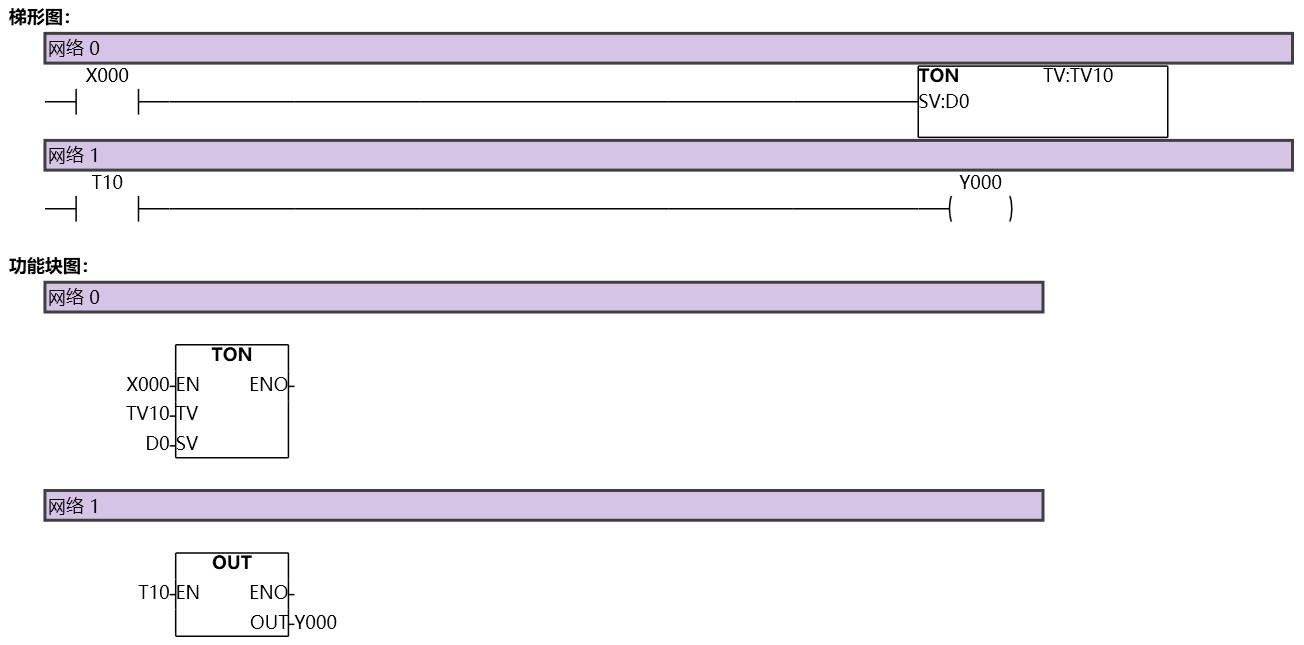
图7 TON
อ่านเพิ่มเติม

