


1. Delete
The deletion column contains basic components and editing objects commonly used when editing ladder diagrams. By clicking the button on the deletion column and selecting the options in the "Object" drop-down menu, you can quickly delete ladder diagram editing.
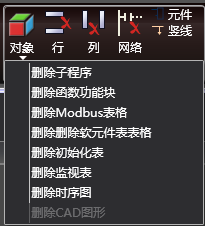
图1 Delet edit
-
-
- Row deletion: * * Delete the currently selected row
-
-
-
- Column deletion: * * Delete the currently selected column
-
-
-
- Network deletion: * * Delete the currently selected network
-
-
-
- Component deletion: * * Delete the currently selected component
-
-
-
- Vertical line deletion: * * Delete the vertical line below the current position
-
-
-
- Object Insertion: * * Delete subroutines/function blocks/Modbus tables/software component tables/initialization tables/monitoring tables/timing diagrams in the current program
-
อ่านเพิ่มเติม
อุปกรณ์ที่ใช้กับคู่มือนี้
2 รายการ

