


1. Insert
The insertion bar contains basic components and editing objects commonly used when editing ladder diagrams. By clicking the buttons on the insertion bar and selecting options from the "Object" drop-down box, you can quickly insert ladder diagram editing.
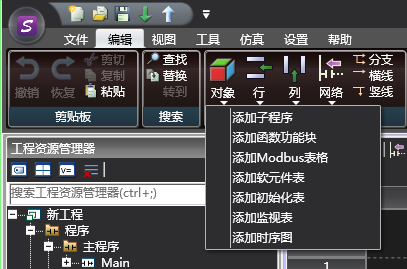
图1 insert edit
-
-
- Line Insertion: * * Insert a new line above/below/at the end of the current position
-
-
-
- Column insertion: * * Insert a new column to the left/right at the current position
-
-
-
- Network Insertion: * * Insert a new network above/below/at the end of the current location
-
-
-
- Branch insertion: * * Branch downwards at the current position
-
-
-
- Horizontal Insertion: * * Draw a horizontal line at the current position
-
-
-
- Vertical Line Insertion: * * Draw a vertical line at the current position
-
-
-
- Object Insertion: * * Insert subroutines/function blocks/Modbus tables/software component tables/initialization tables/monitoring tables/timing diagrams into the current program
-
อ่านเพิ่มเติม
อุปกรณ์ที่ใช้กับคู่มือนี้
2 รายการ

