


1. Folder password protection
Our software will not directly provide password protection for individual data units within the project, but will set passwords for the folders where they are stored. Before opening the data in a folder with a password, the password of the folder will be verified and approved before opening.
Folder with password, open internal subfolders and subfolders The internal data also needs to verify the password of this folder.
There are multiple folders with passwords in the directory above a data unit, and the passwords of these folders will be verified one by one. So please note that these folders should be named differently.
1.1. 1. Folder password setting steps#
To protect a folder with a password, please follow these steps:
Click the "Folder" button in the "Protection" section of the "File" menu.
Select the folder where you want to set a password in the 'Select Folder' section.
Check 'Enable folder password'.
Enter the folder password and password verification, both must be consistent.
Click 'OK'.
In addition, in the "Engineering Resource Manager" window, right-click on a folder and click "Properties" to open the password settings window.
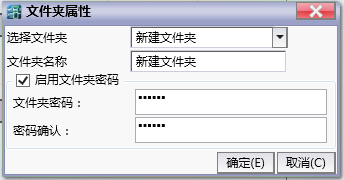
图1 folder password setting
1.2. 2. Folder password cancellation steps#
To remove password protection for a folder, please follow these steps:
Click the "Folder" button in the "Protection" section of the "File" menu.
Select the folder in 'Select Folder' where you want to cancel the password.
Verify the existing password.
Uncheck 'Enable folder password'.
Click 'OK'.
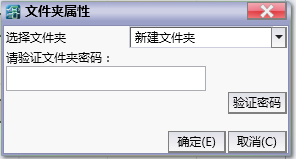
图2 Folder password verification
อ่านเพิ่มเติม

