


1. Engineering password protection
ในหน้านี้5 หัวข้อ
To protect the entire project with a password, please follow these steps:
Click the "Project" button in the "Protection" section of the "File" menu.
Check (engineering protection/download protection/upload protection/monitoring protection), corresponding to the password for each function.
Set password and password confirmation, both must be consistent.
Click 'OK' to complete the configuration.
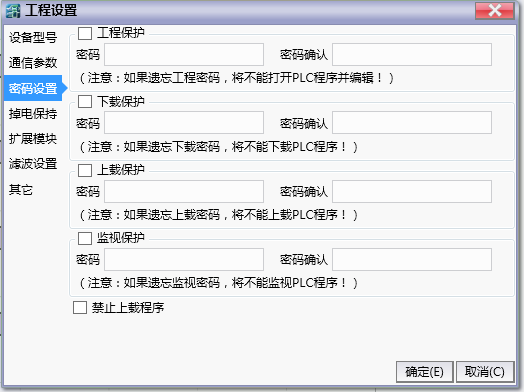
图1 No Password Setting Window
1.1. 1. Engineering protection password#
The engineering protection password provides password protection for the following steps.
Before opening the project, the password will be verified.
Before opening the uploaded project, the password will be verified.
1.2. 2. Download protection password#
The download protection password provides password protection for the following steps.
- The project with download protection password has been loaded into the PLC, and the password will be verified before downloading.
1.3. 3. Upload protection password#
Upload password protection provides password protection for the following steps.
- The project with upload protection password has been loaded into the PLC, and the password will be verified before uploading.
1.4. 4.Monitor and protect passwords#
Monitor and protect passwords to provide password protection for the following steps.
- The project with monitoring protection password has been loaded into the PLC, and the password will be verified before monitoring.
1.5. 5. Prohibit uploading programs#
Provide safer means of protection. After selecting, only the executable program will be downloaded during the download process, and no visual data will be downloaded again.
อ่านเพิ่มเติม

