


1. Adjust the number of input parameters(AND/OR)
1.1. Insert input#
To add an input point to an AND or OR element in a functional block diagram program, the following method can be used.
Move the mouse to an input point of the AND or OR component, right-click to bring up a right-click menu, and click "Insert Parameters Forward" or "Insert Parameters Backward".
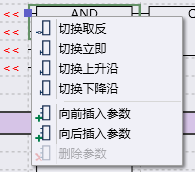
图1 insert parameter
A new input point will be inserted above or below the current input point.
1.2. Cancel input#
To delete an input point to an AND or OR element in a functional block diagram program, the following method can be used.
Move the mouse to an input point of the AND or OR component, right-click to bring up a right-click menu, and click "Delete Parameter".
It will delete the current input point. This operation is only valid when the input point is not connected to the left.
อ่านเพิ่มเติม

