


1. How to use the help document
ในหน้านี้4 หัวข้อ
1.1. 1. Open the help document#
To access the help documentation, please follow one of the following steps::
In the "Help" menu bar, click the "Help" button.
Press the "F1" key to access and select data related help, and by default, access the help document homepage.

1.2. 2. Return to the previous page#
In the toolbar at the top of the help document, click on&# 8220; Previous button.
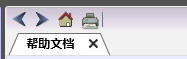
图1 Help Document Toolbar
1.3. 3. Restore the next page#
In the toolbar at the top of the help document, click on&# 8220; Next button
1.4. 4. Print help document#
In the toolbar at the top of the help document, click on&# 8220; Print button
อ่านเพิ่มเติม
อุปกรณ์ที่ใช้กับคู่มือนี้
2 รายการ

