


1. How to establish communication
Ensure that one end of the communication cable (serial port cable, USB cable, or Ethernet cable) is correctly connected to the PLC and the other end is correctly connected to the PC.
In the "Setting" menu ribbon, click the "Communication settings" button to set communication parameters and test the connection.
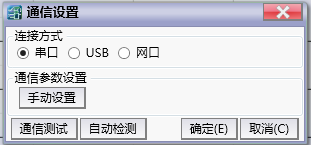
图1 Communication setting
1.1. set communication data#
Serial port parameters need to be set during serial communication. Click on 'Manual Settings' to set the parameters.
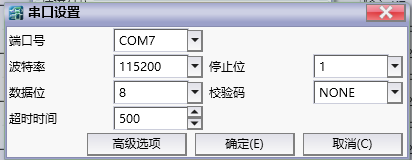
图2 communication data
| Communication parameters | Description |
|---|---|
| Port number | Select the symbol name corresponding to the serial port in the operating system. |
| Baud rate | Select the serial signal rate. |
| Stop bit | The last bit of a single package. |
| Data bits | The number of bits in a single packet. |
| Verification code | You can choose no verification, odd verification, and even verification. |
| Timeout | Maximum tolerable waiting time for receiving data. |
1.2. Test connection#
Click on 'Communication Test' to test if communication can function properly.
1.3. Automatic detection#
Click on 'Auto detect' to synchronously test all feasible communication lines of the current PC, and select a line that can communicate normally as the current line.
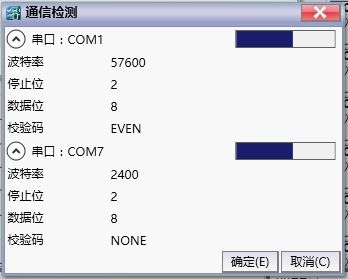
图3 Automatic detection
อ่านเพิ่มเติม
อุปกรณ์ที่ใช้กับคู่มือนี้
2 รายการ

