


Dial switch
Dial switch
Each SK series HMI has dial switch, each of which has its functions.
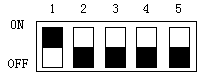
Function list of dial switch
|
Dial switch (5-1) |
Function |
|
All off |
Normal Operation Mode |
|
On 1 |
Coordinate Calibration Mode |
|
On 2 |
Parameter Display Mode |
|
On 3 |
Terminal Mode |
|
On 1 and On3 |
Parameter Setting Mode |

Note:
It needs to restart HMI after adjusting dial switch;
Please apply Normal Operation Mode when using HMI normally;
Parameter Settings Mode applies to set the time, luminance and IP address.
อ่านเพิ่มเติม
อุปกรณ์ที่ใช้กับคู่มือนี้
2 รายการ

