


Update recipe via U disk
SK Series HMI supports importing and updating recipe via U disk.
How to update the recipe file via U disk
1. Compile the project
Run SKTOOL; open the project you want to update; click  to generate the compiled file.
2. Copy the compiled file to the USB disk
Open the directory, copy u-disk-prj.bin to the U disk.
3. Rename the recipe.bin
Rename the recipe.bin as u-disk-recipe.bin
4. Insert the U disk to HMI
5. Copy the file and re-update the project
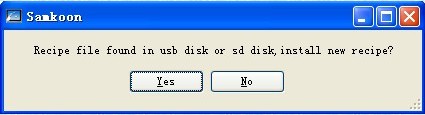
After inserting U disk into HMI, click YES in the pop-up window to execute the update operation.
6. Restart HMI to complete updating
Restart the power supply or restart the HMI by clicking the "Restart" button on the screen.

Note
• Do not disconnect the USB flash drive during the update process;
• Maintain HMI ON during the update process.
อ่านเพิ่มเติม

