


Operation Log
Select the control
icon on the toolbar and set its properties in the dialog box shown below:
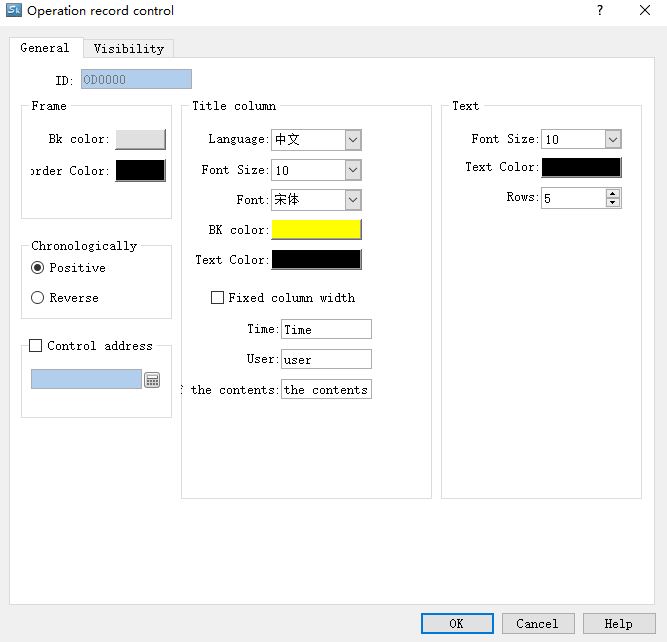
Figure 4-133 Operation Log General dialog box
l Background color: Set the background color of display control
l Border color: Set the border color of display control
l Language: Set the text content on the title bar when select multi-language
l Font size: Font size of title bar
l Background color: Background color of title bar
l Text color: Font color of title bar
l Time: Text to display in the Time column of title bar
l User: Text to display in the User column of title bar
l Operation content: Text to display in the content column of title bar
l Font size: Font size of record text
l Text color: Text color of record text
l Rows: The maximum number of rows the control can display
l Control address:
Write 1 to the address register 0 in address offset (16-bit integer, same to 1 to 12); write the start time to address register 1~ 6 in address offset, and write the end time to that of address register 7 ~ 12. Then the historical alarm display will show the data content during the corresponding time. If you want to display all the historical alarm information, write 0 to the 0 address register. Address Register 13 in Address Offset is not useful for now.
This address occupies 12 consecutive address offset; the meaning of each is as follows:
|
Address offset |
Controlled object by control register address |
|
0 |
1 represents display the data between the start and end time; 0 means all data is displayed. |
|
1 |
Start time (Year) |
|
2 |
Start Time (Month) |
|
3 |
Start time (Day) |
|
4 |
4Start Time (Hour) |
|
5 |
Start Time (Min) |
|
6 |
Start Time (Second) |
|
7 |
End time (Year) |
|
8 |
End Time (Month) |
|
9 |
End Time (Day) |
|
10 |
End Time (Hour) |
|
11 |
End time (Minute) |
|
12 |
End time (Second) |

To enable the HMI operation record, it needs to set the value of LW60600 equal to 1 and the variable table is not empty;
The operation log can only record the variable operation in the variable table.
อ่านเพิ่มเติม

