


Software Alarm Handling
Alarm category and display#
The faults and warnings of servo drives can be classified into three levels based on their severity: Type 1 errors, Type 2 errors, and warnings.
Severity level: Type 1 error>Type 2 error>Warning.
When a single alarm or warning occurs, the status menu of the drive tube will immediately display the current alarm or warning code. When multiple alarms or warnings occur, the alarm code with the highest severity level will be displayed.
Different alarm levels have different displays, and the digital tube alarm displays A.Lxxx represents a type 1 alarm, AL.xxx represents a type 2 alarm, and AL xxx represents a warning;;
example:
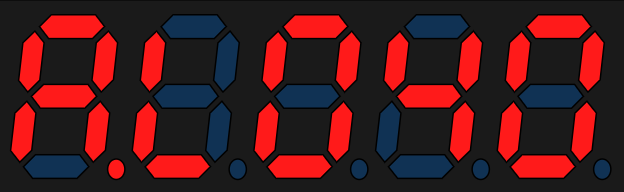
A.L040 is an absolute encoder communication abnormality alarm, which belongs to a type of error. It will be displayed on the tube as:
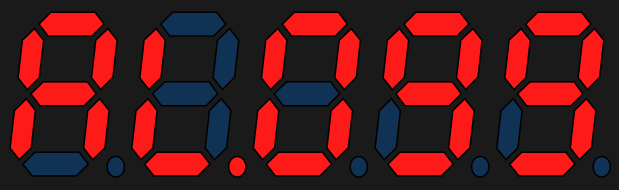
AL.099 is a motor stalling overheat protection alarm, which belongs to Type 2 error. It will be displayed on the tube as:
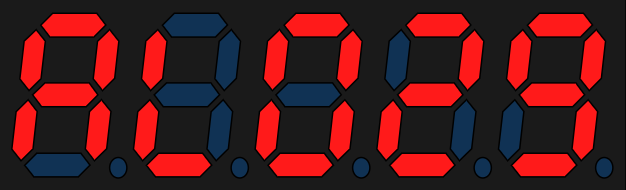
AL029 is a warning for driver motor mismatch, which is displayed on the panel as:
Alarm clearing instructions: Before clearing type 1 and type 2 alarms, the servo enable needs to be turned off first. If it is necessary to forcibly clear the alarm while continuously in enable status, please set PB-29 to 1. Note that this usage may pose a safety hazard.
The following table shows the servo software alarms, describing the alarm names corresponding to the alarm IDs, the clear able attributes of the alarms, and the alarm types.
Alarm ID | Alarm name | Clear able | Alarm type |
10 | User parameter configuration error | no | Type 1 error |
11 | User parameter verification error | no | Type 1 error |
12 | The user parameter value is invalid | no | Type 1 error |
13 | Parameter storage failure | no | Type 1 error |
14 | Parameter reading fault | no | Type 1 error |
15 | EEPROM read and write too fast | no | Type 1 error |
25 | Wrong motor model | no | Type 1 error |
26 | Driver model error | no | Type 1 error |
27 | Driver motor mismatch | yes | warning |
28 | User defined motor | yes | warning |
30 | Encoder type error | no | Type 1 error |
39 | Absolute value system matching error | no | Type 1 error |
40 | Absolute encoder communication abnormality | no | Type 1 error |
41 | Absolute encoder counting abnormality | no | Type 1 error |
42 | Absolute encoder EEPROM reading abnormal | no | Type 1 error |
43 | Absolute encoder multi turn counting error | yes | Type 2 error |
44 | Absolute encoder multi turn counter overflow | yes | Type 2 error |
45 | Absolute encoder battery failure | yes | Type 2 error |
46 | Absolute encoder battery alarm | yes | warning |
47 | Absolute encoder overheating | yes | warning |
50 | Absolute encoder EEPROM data not burned | no | Type 1 error |
55 | Current sampling overflow | yes | Type 1 error |
56 | Current sampling is too slow | yes | Type 1 error |
60 | Error in setting the number of pulses per cycle | yes | Type 2 error |
61 | Electronic gear ratio 1 setting error | yes | Type 2 error |
62 | Electronic gear ratio 2 setting error | yes | Type 2 error |
64 | DI signal allocation error | yes | Type 1 error |
65 | Duplicate DI allocation | yes | Type 1 error |
66 | DO allocation error | yes | Type 1 error |
67 | DI configuration failed | yes | Type 1 error |
70 | Undervoltage | yes | Type 1 error |
71 | Overvoltage | yes | Type 1 error |
72 | Control power undervoltage | no | Type 1 error |
73 | Abnormal boost of bus voltage | yes | Type 1 error |
74 | Power line phase loss | yes | Type 2 error |
75 | Soft start relay damaged | yes | Type 2 error |
76 | Power phase loss warning | yes | warning |
77 | IGBT temperature is too high | no | Type 1 error |
78 | The temperature of the heat sink is too high | no | Type 1 error |
80 | MCU emergency stop | no | Type 1 error |
82 | Bus overcurrent | no | Type 1 error |
83 | U phase overcurrent | no | Type 1 error |
84 | V-phase overcurrent | no | Type 1 error |
85 | W-phase overcurrent | no | Type 1 error |
90 | UVW wiring error | no | Type 1 error |
91 | Suddenly high speed rotation | no | Type 1 error |
92 | speeding | yes | Type 1 error |
95 | Drive overload | yes | Type 2 error |
96 | motor overload | yes | Type 2 error |
97 | motor overload | yes | Type 2 error |
98 | Motor overload warning | yes | warning |
99 | Motor stalling and overheating protection | yes | Type 2 error |
100 | The servo ON command is invalid | yes | Type 2 error |
101 | Excessive positional deviation | yes | Type 2 error |
102 | Abnormal position command input | yes | Type 2 error |
105 | Frequency division pulse output overspeed | yes | Type 2 error |
106 | Accumulated overflow of frequency divided pulses | yes | Type 2 error |
107 | Unreasonable setting of frequency division pulse output | yes | Type 2 error |
108 | Origin reset to zero timeout error | yes | warning |
109 | Overload of regenerative braking resistor | yes | warning |
110 | Regenerative braking resistor overcurrent | yes | warning |
111 | The resistance of the external regenerative braking resistor is too low | yes | warning |
112 | Motor power line broken | yes | warning |
113 | Restart prompt | yes | warning |
114 | Forward overtravel warning | yes | warning |
115 | Reverse overtravel warning | yes | warning |
116 | AI zero offset is too large | yes | warning |
117 | AI1 input too large | yes | warning |
118 | AI2 input too large | yes | warning |
120 | AI1 zeroing failed | yes | warning |
121 | AI2 zeroing failed | yes | warning |
125 | Command pulse signal wiring error | yes | Type 2 error |
126 | Direction signal interference error | yes | warning |
127 | Direction signal interference error | no | Type 1 error |
Alarm Records#
The servo drive has a fault recording function, which can record the names of the last 10 faults and warnings, as well as the status parameters of the servo drive when the fault or warning occurred. If the current alarm ID occurs in the last 5 different alarm records, the current alarm will not be recorded.
After the "alarm clearing" action, the fault record will still save the fault and warning. Except that writing "[2] clear alarm record" through the function code "F-001 alarm clearing", the stored alarm records can be cleared.
By monitoring the parameter 'O-057 Fault Record Index', the alarm record index to be observed can be set. The alarm record information specified by O-057 can be viewed through O-058~O-074. After setting this value to n, O-058~O-074 displays the latest n+1th alarm information. For example, when n=0, it is the latest alarm.
Code | Code name | Unit | Code description |
O-057 | Fault record index | Fault record index, readable and writable | |
O-058 | Fault code | The fault code of the selected alarm | |
O-060 | Fault time | 0.1s | Selected fault time |
O-062 | Speed during malfunction | rpm | Speed at selected fault |
O-063 | U-phase current during malfunction | 0.01A | U-phase current during selected fault |
O-064 | V-phase current during malfunction | 0.01A | V-phase current during selected fault |
O-065 | Bus voltage during malfunction | 0.1V | Bus voltage at selected fault |
O-066 | Input terminal status during malfunction | Input terminal status when selecting faults | |
O-067 | Output terminal status during malfunction | Output terminal status at selected fault | |
O-068 | Command speed during malfunction | rpm | Command speed at selected fault |
O-069 | Command torque during malfunction | ‰ | Command torque for selected faults |
O-070 | Feedback torque during malfunction | ‰ | Feedback torque for selected faults |
O-071 | Position command during malfunction | p | Position command for selected fault |
O-072 | Position deviation during malfunction | p | Position deviation during selected fault |
O-073 | Control word during malfunction | Control word for selected fault | |
O-074 | Status word during malfunction | Status word for selected fault |
6.3.3 Software Alarm Handling Methods
Alarm code | Alarm name | Fault reason | Handling method |
11 | User parameter verification error | 1.Power outage occurs during parameter reset process | 1. After the servo enable input is OFF, perform parameter reset operation (F-000 =2) and restart the servo (power off restart or F-000= 1) 2. set P0-25= 1 to turn off this alarm |
2.Firmware update | |||
12 | user parameter value is invalid | The parameter value is less than the specified minimum value or greater than the specified maximum value | 1. After the servo enable input is OFF, perform parameter reset operation (F-000=2) and restart the servo (power off restart or F-000 = 1) 2. Check the abnormal parameter group number and offset through O-078 and O-079, and correct the corresponding parameter values. |
13 | Parameter storage failure | User parameter EEPROM write failed | 1. Check if EEPROM is damaged or has virtual soldering 2. Replace the drive |
14 | Parameter reading fault | User parameter EEPROM read failed |
|
15 | Parameter write overflow | EEPROM write request too fast | 1. Check if parameters are frequently written. If pulse servo does require continuous writing through RS485, add 1 before the highest bit of the write address (such as changing the address of parameter P0540 from 0x528 to 0x8528). If EtherCAT bus servo uses SDO to frequently write data, P09-13 can be set to 0. 2. Check if the operation with the current position as the origin (P5-40 is set to 6). If so, please note that the setting only needs to be set once and does not need to be repeated. After returning to the original position, P5-40 will automatically reset to zero. |
21 | Location execution timeout fault | When the position loop is executed continuously for 4 times and the execution cycle is too long |
|
25 | Motor model error | 1. The firmware is too old to support this motor | Update Firmware |
2.Unsupported motor model set | Check if the "P0-01 motor model" setting is correct | ||
26 | Driver mode error | Set the Wrong drive model | Check if the "P11-00 Drive Model" setting is correct |
27 | Driver and motor do not match | Rated power motor>driver | 1. Check if the "P0-01 motor model" setting is correct 2. Check if the "P11-00 Drive Model" setting is correct 3. Replace the driver with higher power or replace the motor with lower power 4. If it is confirmed that the motor and driver can be matched for use, P0B-28=1 can be set to shield this warning。 |
28 | User defined motor | Set P00-01=65535 |
|
30 | Encoder type error | Set Unsupported encoder type | 1.Check if the "P0-01 motor model" setting is correct 2.Check if the motor encoder cable connection is normal |
39 | Absolute value system matching error | Absolute value mode was selected (P0.03=1 or 2), and the resulting motor is a single turn motor | 1. Determine whether the motor is a single turn motor or a multi turn motor based on the motor nameplate. If it is a single turn motor, it needs to be replaced with a multi turn motor 2.when the motor is a multi turn motor and P0.03 is set to 1 or but still alarms Al.039, it is necessary to contact our technical team to update the motor parameters |
40 | Absolute encoder communication abnormality | 2. Encoder cable connection failure | 1. Check if the motor encoder cable is correctly connected to the servo 2. Check if the motor encoder cable is properly conductive (replaceable encoder cable for testing) |
3. Encoder damaged | Replace motor | ||
41 | Absolute encoder counting abnormality | Encoder fault |
|
42 | Absolute encoder EEPROM reading abnormal | Encoder fault |
|
43 | Absolute encoder multi turn counting error | Encoder fault |
|
44 | Absolute encoder multi turn counter overflow | Encoder fault |
|
45 | Absolute encoder battery failure | 1. Encoder battery not connected | 1. Check if the encoder cable comes with a battery pack 2. Check if the motor encoder cable is properly conductive |
2. Encoder battery low | Replace the battery with a voltage matching (3.6V) | ||
46 | Absolute encoder battery alarm | 1. The encoder battery voltage is lower than the alarm voltage | Replace the battery with a voltage matching (3.6V) |
2. Encoder battery low | |||
47 | Absolute encoder overheating | 1、Encoder temperature too high | 1. Improve the heat dissipation conditions of the motor 2. encoder reset operation (write 1 for "F-004 Absolute Encoder Reset Operation") |
2、encoder broken | If it occurs repeatedly, replace the motor | ||
50 | Motor model not written in | The model number of the motor was not written in when production | Contact the supplier to replace the motor 2. Contact technical personnel to write the motor model number 3. Check if the firmware version of P016-00 is 1.31 or above, |
60 | Error in setting the number of pulses per cycle | The number of pulses per cycle is set too small or too large | Ensure that the value range of P5-00 for the number of pulses per cycle is 3~107 |
61 | Electronic gear ratio 1 setting error | The setting of electronic gear ratio 1 is unreasonable | Ensure that the gear ratio setting satisfies the following relationship P0501: Electronic gear ratio 1 molecule P0502: Electronic gear ratio 1 denominator P1002: Encoder single cycle pulse count |
62 | Electronic gear ratio 2 setting error | The setting of electronic gear ratio 2 is unreasonable | Ensure that the gear ratio setting satisfies the following relationship P0503: Electronic gear ratio 2 molecules P0504: Electronic gear ratio 2 denominator P1002: Encoder single cycle pulse count |
64 | DI signal allocation error | DI assigned signals that are not allowed | Check the P01 group parameters to ensure that no illegal values are used in the configuration of each DI function |
65 | Duplicate DI allocation | When allocating DI functions, the same function is repeatedly assigned to multiple DI terminals | 1. Check the P01 group parameters to ensure that there are no duplicate configurations for each DI function 2. Check the P15 group parameters to ensure that there are no duplicate items in the virtual IO allocation function |
66 | DO allocation error | DO has assigned signals that are not allowed | 1. Check the P02 group parameters to ensure that no illegal values are used in the configuration of each DO function 2. Check the P15 group parameters to ensure that there are no duplicate items in the virtual IO allocation function |
70 | Under voltage | 1. The input voltage of the power supply is too low | Check the input power specifications of the driver and measure whether the input voltage on the non driver side and driver side (L1 L2 L3) of the main circuit cable meets the following specifications: 220V driver Valid value:220V-240V Allow deviation:-10%~+10%(198V~264V) 380V driver Valid value: 380V-440V Allow deviation:-10%~+10%(342V~484V) |
2. Instantaneous power outage occurs | Ensure stable power supply | ||
3. Power supply voltage drops during operation | Monitor the input power voltage of the driver and check if the same main circuit power supply has turned on too many other devices, causing insufficient power capacity and voltage drop | ||
4. Power phase loss | Check the input power specifications of the drive. If it is a three-phase power supply, ensure that L1, L2, and L3 have three-phase power connected | ||
71 | Over voltage | 1、The input voltage of the main circuit is too high | Check the input power specifications of the driver and measure whether the input voltage on the non driver side and driver side (L1 L2 L3) of the main circuit cable meets the following specifications: 220V driver Effective value: 220V-240V Allowable deviation: -10%~+10% (198V~264V) 380V driver Effective value: 380V-440V Allowable deviation: -10%~+10% (342V~484V) |
2、The braking resistor is not connected, damaged, or too much resistance value |
| ||
3、Excessive backflow energy during rapid deceleration | 1.If the working conditions permit, increase the deceleration time during operation 2. Reduce the load and, if conditions permit, purchase a gearbox | ||
72 | Control power under voltage | 1、The input voltage of the power supply is too low | Check the input power specifications of the driver and measure whether the input voltage on the non driver side and driver side (L1 L2 L3) of the main circuit cable meets the following specifications: 220V driver Effective value: 220V-240V Allowable deviation: -10%~+10% (198V~264V) 380V driver Effective value: 380V-440V Allowable deviation: -10%~+10% (342V~484V) |
2、Unstable power supply | 1. Check if the power cable has good contact 2. Check if the power supply is stable | ||
73 | Abnormal bus line voltage rise | Frequent power on/off causing abnormal power supply | 1. Ensure that the interval between power on and off of the drive is not less than 1 minute 2. If an alarm has been triggered, wait for 3 minutes after power failure to restore power supply 3. P00-15 is set to 1. Turning off the power-off rapid discharge function can reduce the occurrence of this alarm. 4. When P0B-30 is set to 3000, this alarm can be blocked |
74 | Power line phase loss | Three phase input wiring error | 1. Check if three-phase power supply is used (L1, L2, L3 are all connected) 2. Check if the power cable is in good contact 3. Setting the "PB-02 Power Input Phase Loss Protection Selection" to 2 can block this alarm |
75 | Soft start relay damaged | Hardware soft start relay damaged | Return to the factory for repair and replace the soft start relay |
76 | Power phase loss warning | Three phase input wiring error | 1. Check if three-phase power supply is used (L1, L2, L3 are all connected) 2. Check if the power cable is in good contact 3. Setting the "PB-02 Power Input Phase Loss Protection Selection" to 2 can block this alarm |
77 | IGBT temperature is too high | 1. The ambient temperature is too high | 1. Improve the cooling conditions of the drive and strictly follow the recommended installation direction and interval for the drive installation 2. Reduce the ambient temperature of the servo drive |
2. Fan malfunction | 1. Check if the fan blades are stuck by other objects 2. Replace the drive | ||
3. Long term overload operation | 1. Increase the acceleration and deceleration time during operation 2. Reduce load 3. Replace with higher power drivers and motors | ||
78 | The temperature of the heat sink is too high | 1. The ambient temperature is too high | 1. Improve the cooling conditions of the drive and strictly follow the recommended installation direction and interval for the drive installation 2. Reduce the ambient temperature of the servo drive |
2. Fan malfunction | 1. Check if the fan blades are stuck by other objects 2. Replace the drive | ||
3. Long term overload operation | 1. Increase the acceleration and deceleration time during operation 2. Reduce load 3. Replace with higher power drivers and motors | ||
82 | Bus line over current | 1. The braking resistor is too small or short circuited | When using the built-in braking resistor (P, D short circuit) Disconnect the power terminals P and D, measure the resistance between D and C. If the resistance is 0, replace the built-in braking resistor When using an external braking resistor (P, C connected) Measure the resistance value of the external braking resistor. If there is a short circuit or it is too small, replace the external braking resistor. Please follow the "Braking resistor selection instructions" to select the braking resistor. After replacement, set P00-05~P00-07 according to the actual situation |
2. Motor power line wiring error | 1. Check the correctness of the wiring of the motor power lines U, V, W, and PE 2. Check if the wiring of the motor power lines U, V, W, and PE is loose | ||
3. Motor power line short circuit | 1. Check the wiring of the motor power lines U, V, W, and PE, and observe if there is a short circuit 2. Disconnect the motor power line from the servo connection, measure whether there is a short circuit between the motor U, V, W, and PE. If there is a short circuit, replace the motor | ||
4. Motor damage | Disconnect the motor power line from the servo connection, measure whether the resistance between motor U, V, and W is balanced (measure the resistance between UV, UW, and VW respectively). If it is unbalanced (the resistance difference between the three measurements is too large), replace the motor | ||
5. Abnormal input command | 1. Ensure to input commands after servo enable ON 2. Increase the acceleration and deceleration time of input commands | ||
6. Unreasonable gain setting | Servo gain adjustment, the servo gain can be set to the factory default value and readjusted to reduce overshoot | ||
83 | U phase over current | 1. Motor power line wiring error | 1. Check the correctness of the wiring of the motor power lines U, V, W, and PE 2. Check if the wiring of the motor power lines U, V, W, and PE is loose |
2. Motor power line short circuit | 1. Check the wiring of the motor power lines U, V, W, and PE, and observe if there is a short circuit 2. Disconnect the motor power line from the servo connection, measure whether there is a short circuit between the motor U, V, W, and PE. If there is a short circuit, replace the motor | ||
3. Motor damage | Disconnect the motor power line from the servo connection, measure whether the resistance between motor U, V, and W is balanced (measure the resistance between UV, UW, and VW respectively), if it is unbalanced (the resistance difference between the three measurements is too large), replace the motor | ||
4. Abnormal input command |
| ||
5. Unreasonable gain setting | Servo gain adjustment, the servo gain can be set to the factory default value and readjusted to reduce overshoot | ||
84 | V phase over current | 1. Motor power line wiring error | 1. Check the correctness of the wiring of the motor power lines U, V, W, and PE 2. Check if the wiring of the motor power lines U, V, W, and PE is loose |
2. Motor power line short circuit | 1. Check the wiring of the motor power lines U, V, W, and PE, and observe if there is a short circuit 2. Disconnect the motor power line from the servo connection, measure whether there is a short circuit between the motor U, V, W, and PE. If there is a short circuit, replace the motor | ||
3. Motor damage | Disconnect the motor power line from the servo connection, measure whether the resistance between motor U, V, and W is balanced (measure the resistance between UV, UW, and VW respectively), if it is unbalanced (the resistance difference between the three measurements is too large), replace the motor | ||
4. Abnormal input command |
| ||
5. Unreasonable gain setting | Servo gain adjustment, the servo gain can be set to the factory default value and readjusted to reduce overshoot | ||
85 | W phase over current | 1. Motor power line wiring error | 1. Check the correctness of the wiring of the motor power lines U, V, W, and PE 2. Check if the wiring of the motor power lines U, V, W, and PE is loose |
2. Motor power line short circuit | 1. Check the wiring of the motor power lines U, V, W, and PE, and observe if there is a short circuit 2. Disconnect the motor power line from the servo connection, measure whether there is a short circuit between the motor U, V, W, and PE. If there is a short circuit, replace the motor | ||
3. Motor damage | Disconnect the motor power line from the servo connection, measure whether the resistance between motor U, V, and W is balanced (measure the resistance between UV, UW, and VW respectively), if it is unbalanced (the resistance difference between the three measurements is too large), replace the motor | ||
4. Abnormal input command |
| ||
5. Unreasonable gain setting | Servo gain adjustment, the servo gain can be set to the factory default value and readjusted to reduce overshoot | ||
90 | UVW wiring error | Motor power line UVW wiring error | Check the UVW wiring of the motor power line and correct any wiring errors |
91 | Sudden Speed motor | 1. Motor power line UVW connected incorrectly | Check the UVW wiring of the motor power line and correct any wiring errors |
2. Motor model setting error | Check if the "P0-01 motor model" setting matches the motor model identified on the motor nameplate. The motor model code corresponding to the P00-01 number can be viewed through the servo upper control system | ||
3. Under vertical axis working conditions, excessive gravity load | 1. Ensure that the value of "P0A-08” ( brake open delay time) is less than "P0A-09”(brake open command reception delay time), and the difference is not less than 100ms 2. Reduce vertical axis load 3. Appropriately increase the rigidity level of P03-01 | ||
92 | Over speed | 1. Motor power line UVW connected incorrectly | Check the UVW wiring of the motor power line and correct any wiring errors |
2. Motor model setting error | Check if the "P0-01 motor model" setting matches the motor model identified on the motor nameplate. The motor model code corresponding to the P00-01 number can be viewed through the servo upper control system | ||
3. The over speed threshold is set too low | Check the value of "PB-16 overspeed determination threshold" to ensure that it is greater than the maximum motor speed required for actual operation | ||
4. The input command speed is too fast | Location operation mode 1. Reduce the input pulse command frequency while ensuring accurate final positioning 2. If the operating speed allows, increase the "P5-00 single turn pulse number" (when P5-00 is set to 0, the electronic gear ratio P5-01~P5-02 will be used to calculate the single turn pulse number) Speed operation mode 1. Ensure that the input speed command (P6-00~P6-03 setting) remains below the "PB-16 overspeed determination threshold" at all times 2. Reduce the 'P6-07 maximum speed limit' to below the 'PB-16 overspeed determination threshold' | ||
5. Torque operation mode without speed limitation | 1. Set appropriate speed limits (P7-12~P7-14) to ensure that the torque mode speed limit value is less than the set value of "PB-16 overspeed judgment threshold" 2. Perform torque limitation (P7-04~P7-08 settings) to prevent excessive output torque | ||
6. Speed loop overshoot | operate gain adjustment, refer to gain adjustment for adjustment method | ||
95 | Driver over load | 1. Abnormal wiring of motor power cable (motor cannot operate normally) | 1. Check the UVW wiring of the motor power line and correct any wiring errors 2. Check for errors in connecting other shaft power lines or encoder lines |
2. Inappropriate gain adjustment or rigidity too strong (the motor cannot operate normally, or there is vibration during operation) | gain adjustment, refer to gain adjustment method | ||
3. The brake is not turned on (the motor cannot operate normally) | 1. Check if the wiring of the brake is in accordance with the recommended wiring. It is not allowed to use servo IO for direct wired, and a relay needs to be added and use an external power source for driving 2. Check if the function configuration of the servo output terminal is correct. The default configuration is DO3 for brake output (P2-02 is set to 10) 3. Ensure that the value of "P0A-08” ( brake open delay time) is less than "P0A-09”(brake open command reception delay time), and the difference is not less than 100ms 4. Remove the motor, connect the brake to the 24V power supply. If the motor shaft cannot be rotated, it indicates that the motor brake device is damaged and needs to be replaced | ||
4. The load is too heavy, and the drive has been working in an overloaded state for a long time | 1. Increase the acceleration and deceleration time during operation 2. Reduce the frequency of acceleration and deceleration operation and increase the cycle of acceleration and deceleration operation 3. Replace high-power driver and matching motor 4. Reduce the load and, if conditions permit, purchase a gearbox 5. Set the parameter 'PB-05 overload alarm disable' to 2 to turn off the alarm (recommended for use only during debugging phase) | ||
5、Motor stalling caused by mechanical factors | 1. When the mechanical load is light, disconnect the power and manually drag the machine to run. Check if there is strong resistance in certain positions and eliminate the resistance 2. When the load is heavy, disconnect the enable of the servo and use the jog function (F-002) to operate. Observe whether there are sudden deceleration points during operation, and troubleshoot and eliminate mechanical abnormalities | ||
6、Driver model setting error | Check if the "P11-00 Drive Model" matches the drive nameplate (the correspondence between numbers and model codes can be viewed in the upper software) | ||
96 | Motor over load | 1. Abnormal wiring of motor power cable (motor cannot operate normally) | 1. Check the UVW wiring of the motor power line and correct any wiring errors 2. Check for errors in connecting other shaft power lines or encoder lines |
2. Inappropriate gain adjustment or rigidity too strong (the motor cannot operate normally, or there is vibration during operation) | gain adjustment, refer to gain adjustment method | ||
3. The brake is not turned on (the motor cannot operate normally) | 1. Check if the wiring of the brake is in accordance with the recommended wiring. It is not allowed to use servo IO for direct wired, and a relay needs to be added and use an external power source for driving 2. Check if the function configuration of the servo output terminal is correct. The default configuration is DO3 for brake output (P2-02 is set to 10) 3. Ensure that the value of "P0A-08” ( brake open delay time) is less than "P0A-09”(brake open command reception delay time), and the difference is not less than 100ms 4. Remove the motor, connect the brake to the 24V power supply. If the motor shaft cannot be rotated, it indicates that the motor brake device is damaged and needs to be replaced | ||
4. The load is too heavy, and the drive has been working in an overloaded state for a long time | 1. Increase the acceleration and deceleration time during operation 2. Reduce the frequency of acceleration and deceleration operation and increase the cycle of acceleration and deceleration operation 3. Replace high-power driver and matching motor 4. Reduce the load and, if conditions permit, purchase a gearbox 5. Set the parameter 'PB-05 overload alarm disable' to 2 to turn off the alarm (recommended for use only during debugging phase) | ||
5、Motor stalling caused by mechanical factors | 1. When the mechanical load is light, disconnect the power and manually drag the machine to run. Check if there is strong resistance in certain positions and eliminate the resistance 2. When the load is heavy, disconnect the enable of the servo and use the jog function (F-002) to operate. Observe whether there are sudden deceleration points during operation, and troubleshoot and eliminate mechanical abnormalities | ||
6、Driver model setting error | Check if the "P11-00 Drive Model" matches the drive nameplate (the correspondence between numbers and model codes can be viewed in the upper software) | ||
97 | |||
98 | Motor overload warning | The load is too heavy, and the motor works in an overloaded state for a long time | 1.Increase the acceleration and deceleration time during operation 2. Reduce the frequency of acceleration and deceleration operation and increase the cycle of acceleration and deceleration operation 3. Replace high-power motor and matching driver 4. Reduce the load and, if conditions permit, purchase a gearbox 5. Set the parameter 'PB-05 overload alarm disable' to 1 to turn off the alarm (recommended for use only during debugging phase) |
99 | Motor stalling | 1. Wiring error | 1. Check if the motor power line UVW is connected incorrectly or not connected 2. Check for errors in connecting other shaft power lines and encoder lines |
2. The brake is not turned on (the motor cannot operate normally) | 1、Check if the brake wiring is in accordance with the recommended wiring. It is not allowed to use servo IO directly for driving, and a relay needs to be added to use an external power source for driving 2. Check if the function configuration of the servo output terminal is correct. The default configuration is DO3 for brake output (P2-02 is set to 10) 3、Ensure that the value of "P0A-08” ( brake open delay time) is less than "P0A-09”(brake open command reception delay time), and the difference is not less than 100ms 4、Remove the motor, connect the brake to the 24V power supply. If the motor shaft cannot be rotated, it indicates that the motor brake device is damaged and needs to be replaced | ||
3、Motor stalling caused by mechanical factors | 1. When the mechanical load is light, disconnect the power and manually drag the machine to run. Check if there is strong resistance in certain positions and eliminate the resistance 2. When the load is heavy, disconnect the enable of the servo and use the jog function (F-002) to operate. Observe whether there are sudden deceleration points during operation, and troubleshoot and eliminate mechanical abnormalities | ||
100 | The servo ON command is invalid | Input servo ON signal during internal enable | Do not use IO or bus enabled servo during jogging, self-tuning, and angle recognition |
101 | Excessive positional deviation | 1. Wiring error | 1. Check if the motor power line UVW is connected incorrectly or not connected 2. Check for errors in connecting other shaft power lines and encoder lines |
2. Motor stalling caused by mechanical factors | 1. When the mechanical load is light, disconnect the power and manually drag the machine to run. Check if there is strong resistance in certain positions and eliminate the resistance 2. When the load is heavy, disconnect the enable of the servo and use the jog function (F-002) to operate. Observe whether there are sudden deceleration points during operation, and troubleshoot and eliminate mechanical abnormalities | ||
3. The brake is not turned on (the motor cannot operate normally) | 1、Check if the brake wiring is in accordance with the recommended wiring. It is not allowed to use servo IO directly for driving, and a relay needs to be added to use an external power source for driving 2. Check if the function configuration of the servo output terminal is correct. The default configuration is DO3 for brake output (P2-02 is set to 10) 3、Ensure that the value of "P0A-08” ( brake open delay time) is less than "P0A-09”(brake open command reception delay time), and the difference is not less than 100ms 4、Remove the motor, connect the brake to the 24V power supply. If the motor shaft cannot be rotated, it indicates that the motor brake device is damaged and needs to be replaced | ||
poor tracking performance due to the Inappropriate servo gain |
| ||
102 | Abnormal position command input | 1. Input pulse frequency too high | Ensure that the input command pulse frequency is not greater than the "maximum pulse input frequency at PB-11 position" |
2. The input pulse is disturbed | 1. The pulse input cable adopts twisted pair shielded wire and is separately wired from the driver power line 2. Increase the "P5-18 pulse signal filtering time" and "P5-19 direction signal input filtering time" | ||
105 | Frequency division pulse output overspeed | Frequency division output frequency greater than servo output capability | 1. Set a smaller "P5-30 pulse output single-phase pulse number" 2. Reduce the maximum speed of servo operation 3. Increase the single-phase maximum frequency of P5-29 pulse output |
106 | Accumulated overflow of frequency divided pulses | Frequency division output, delayed output pulse too large | 1. Set a smaller "P5-30 pulse output single-phase pulse number" 2. Reduce the average speed of servo operation 3. Increase the single-phase maximum frequency of P5-29 pulse output |
107 | Unreasonable setting of frequency division pulse output | Unreasonable setting of frequency division output parameters | 1. Increase the maximum frequency of the encoder's frequency division output 2. Reduce the number of pulses per cycle output by the encoder's frequency division |
108 | Zero return timeout error | Origin switch malfunction | 1. Ensure that the origin switch is correctly connected 2. Ensure that the origin switch is working properly, adjust sensitivity correctly, and prevent it from being in a constant ON or OFF state 3. Ensure that the origin switch is positioned between the limit switches |
Input terminal configuration error | 1. Check the configuration of the P01 parameter input terminal to see if the terminal function was incorrectly configured as "[32] Origin Regression Trigger Signal", but the function "[31] Origin Signal" was not assigned to the input terminal 2. Check that the P01 group has been assigned the input terminal for the "[31] origin signal" and wired according to the correct logic to ensure the correctness of the terminal logic selection. The default is "low effective (ON)" | ||
Improper configuration of the reset function | 1. Check if the zeroing direction set in the "P5-41 Origin Reset Mode" is consistent with the actual forward and reverse directions of operation (the "P0-02 Motor Rotation Positive Direction Definition" can modify the forward direction of motor rotation selection) 2. Increase the 'P5-45 origin search time' 3. Increase the "P5-42 origin high-speed search speed" to ensure that the time required to search for the origin using this speed at all zero return positions is not greater than the "P5-45 origin search time" | ||
109 | Overload of braking resistor | 1. Braking resistor not connected | 1. When using the built-in braking resistor, ensure that the P and D terminals in the power terminal are short circuited (400w and below drivers do not include the built-in braking resistor) 2. When using an external braking resistor, ensure that it is correctly connected to the power terminals P and C |
2. Brake resistor damaged | After the servo is powered off, measure the resistance between the power terminals P and C to see if it is ∞. If so, replace the braking resistor. If the current one is using an internal braking resistor (with P and D short circuited in the power terminals), consider disconnecting the P and D connections and using a compliant external braking resistor (please select the braking resistor according to the braking resistor selection instructions) to connect to the power terminals P and C | ||
3. Incorrect brake parameter configuration | According to actual usage, correctly configure parameters P0-05~P0-07 | ||
4. The resistance of the braking resistor is too high | Select the braking resistor according to the selection instructions, and after replacement, configure parameters P0-05~P0-07 correctly based on actual usage | ||
5. Supply voltage too high | Check the input power specifications of the driver and measure whether the input voltage on the non driver side and driver side (L1 L2 L3) of the main circuit cable meets the following specifications: 220V driver Effective value: 220V-240V Allowable deviation: -10%~+10% (198V~264V) 380V driver Effective value: 380V-440V Allowable deviation: -10%~+10% (342V~484V) | ||
6、急减速时回流能量过大 | 1. Increase the deceleration time during operation 2. Increase the operating cycle and reduce the proportion of deceleration period time 2. Choose a high-power external brake resistor, select the brake resistor according to the brake resistor selection instructions, replace it according to the actual usage situation, and correctly configure parameters P0-05~P0-07 3. Reduce the load and, if conditions permit, purchase a gearbox 4. Replace high-power driver | ||
111 | The resistance value of the external braking resistor is too small | The resistance value of the external braking resistor is too small | 1. Ensure that the parameter 'P0-07 external regeneration resistor resistance value' is configured correctly 2. Replace with an external regeneration resistor with a higher resistance value, ensuring that its value is greater than the "P11-47 Driver Allowable Minimum Regeneration Resistance" |
112 | Motor power line broken | Motor power line broken | 1. Check if the motor power line is connected 2. Check if the motor power cable is in good condition |
113 | Restart prompt | The parameters that need to be restarted to take effect have been modified | 1. Power off and restart the servo 2. Disconnect servo enable, write function code F-000 1, restart servo |
114 | Forward over travel warning | Positive over travel signal takes effect | 1. When no forward overtravel signal is required, confirm that no DI input terminal is configured as a forward overtravel signal (signal code 14). The default DI3 configuration is for this function (P1-06 is configured as 14) 2. Confirm that the input logic of the DI terminal configured as a forward overtravel signal is correct. The default DI3 configuration is set to this function (P1-06 is set to 14), and the default effective logic is set to be effective when the input is ON (P1-22 is set to 0) 3. Check if the wiring and proximity switch installation are correct. The input DI signal can be observed through O-29, and DI3 is set to this function by default (P1-06 is configured as 14). Change the input switch signal and observe if the third digit of the O-29 binary number changes to determine the correctness of the wiring and input switch signal 4. Under the condition of confirming safety, give a reverse command or rotate the motor in the reverse direction to make the machine run to the position where the forward limit switch has not been triggered (the alarm will be automatically cleared after leaving the limit switch) |
115 | Reverse over travel warning | Reverse over travel signal takes effect |
|
117 | AI1 input too large |
| Ensure that the voltage input of analog channel AI1 is not greater than 10V, and AI1 is input by AI1+(32) and AI1- (17) of control terminal CN1 |
| Check if the value of parameter "P8-06 AI1 zero drift" is unreasonable. The default zero drift is 0V | ||
118 | AI2 input too large |
| Ensure that the voltage input of analog channel AI2 is not greater than 10V, and AI2 is input by AI2+(18) and AI2- (19) of control terminal CN1 |
| Check if the value of parameter "P8-11 AI2 zero drift" is unreasonable. The default zero drift is 0V | ||
120 | AI1 zeroing failed | AI1 zero adjustment analog input is not 0V | Ensure that when the servo is powered on or when using analog voltage zeroing F-005, the AI1 analog input is 0, and AI1 is input by AI1+(32) and AI1- (17) of control terminal CN1 |
121 | AI2 zeroing failed | AI2 zero adjustment analog input is not 0V | When the servo is powered on or when using analog voltage zeroing F-005, the analog input of AI2 is 0, and AI2 is input by AI2+(18) and AI2- (19) of control terminal CN1 |
125 | Command pulse wiring error | 1. Pulse input signal type configuration error | 1. Check if the configuration of the "P5-16 instruction pulse shape" matches the actual input signal type. When using AB phase 4 times harmonic input, please set P5-16 to 1 2. Increase the value of PB-21 and set it to 65535 to turn off the alarm |
2. Command pulse signal wiring error | Check if the command signal and pulse signal are connected in reverse, and if the pulse signal line is connected properly | ||
126 | Direction of signal interference | During operation, the directional signal is disturbed, resulting in a correctable error in pulse counting |
|
127 | Direction signal interference error | During operation, the directional signal was disturbed and the pulse counting has a serious error |
|
177 | Position ring execution timeout warning | When the position loop is executed twice in a row and the execution cycle is too long |
|
180 | Modbus receive cache overflow | When the data received by Modbus is greater than the maximum data that can be processed, a warning will be issued | 1. Ensure that the 485 communication cable is wired properly. 2. Ensure that the communication station number and baud rate of 485 are set correctly 3. Ensure that there are no erroneous nodes occupying communication resources on the communication line |
190 | Continuous sampling data with frame loss | When using a virtual oscilloscope, the amount of data is too large, or the communication cable is unplugged during sampling | 1. Alarm, does not affect normal use, only serves as a prompt when using a virtual oscilloscope |
191 | Multiple positions trigger anomalies | When multiple segment positions are being executed, triggering DI multiple segment positions again will generate AL.191 alarm | 1. Avoid triggering again while executing at multiple locations 2. P0B-31 parameter set to 1 to shield the alarm |
อ่านเพิ่มเติม
