


1. Zone control ZONE/ZONED/ZONEF
ในหน้านี้7 หัวข้อ
1.1. Instruction Description#
The single word ZONE instruction controls the output value (OUT) based on whether the input value (IN3) is positive or negative, using a specified deviation value.
The Double Word zone Control (ZONED) and Floating Point Area Control (ZONEF) correspond to the types of Double Word and Floating Point, respectively.
When IN3 (input value)<0, OUT (output value) is set to IN3 (input value)+IN1 (negative deviation value).
When IN3 (input value)>0, OUT (output value) is set to IN3 (input value)+IN2 (positive deviation value).
When IN3 (input value) is 0, OUT (output value) is set to 0.
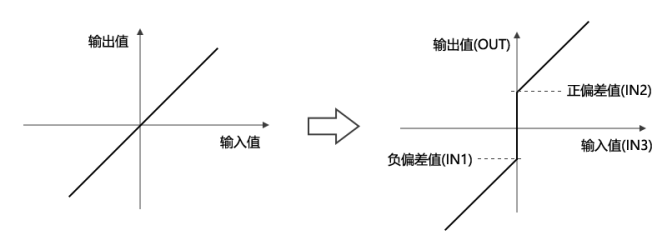
图1 Upper and Lower Limit Control
1.2. The valid operands of the instruction#
1.2.1. Single word area control(ZONE)#
| Input/Output | Data Type | operand | Description |
|---|---|---|---|
| MIN | 16 bit integer | D/CV/TV/AI/AO/K/H/V/Z/FD, bit composite word (X/Y/M/C/T/S), local variable (LW) | minimum |
| MAX | 16 bit integer | D/CV/TV/AI/AO/K/H/V/Z/FD, bit composite word (X/Y/M/C/T/S), local variable (LW) | maximum |
| VAL | 16 bit integer | D/CV/TV/AI/AO/K/H/V/Z/FD, bit composite word (X/Y/M/C/T/S), local variable (LW) | current value |
| OUT | 16 bit integer | D/CV/TV/AO/V/Z, bit composite word (Y/M/C/T/S), local variable (LW) | output |
1.2.2. 双字区域控制(ZONED)#
| 输入输出 | 数据类型 | 操作数 | 描述 |
|---|---|---|---|
| MIN | 32位整数 | D/CV/K/H/FD, 位合成字(X/Y/M/C/T/S), 局部变量(LD) | 最小 |
| MAX | 32位整数 | D/CV/K/H/FD, 位合成字(X/Y/M/C/T/S), 局部变量(LD) | 最大 |
| VAL | 32位整数 | D/CV/K/H/FD, 位合成字(X/Y/M/C/T/S), 局部变量(LD) | 当前值 |
| OUT | 32位整数 | D/CV, 位合成字(Y/M/C/T/S), 局部变量(LD) | 输出 |
1.2.3. Float zone control(ZONEF)#
| Input/Output | Data Type | operand | Description |
|---|---|---|---|
| MIN | 32-bit real number | D/K/FD, local variable (LF) | minimum |
| MAX | 32-bit real number | D/K/FD, local variable (LF) | maximum |
| VAL | 32-bit real number | D/K/FD, local variable (LF) | current value |
| OUT | 32-bit real number | D, local variable (LF) | output |
1.3. Example#
command table:
NETWORK 000
LDP X000
BIN K16X20 D0 // Convert the BCD values of X020~X037 to integers and store them in D0
ZONE K-1000 K1000 D0 D1 // Perform area control on D0 and output it to D1
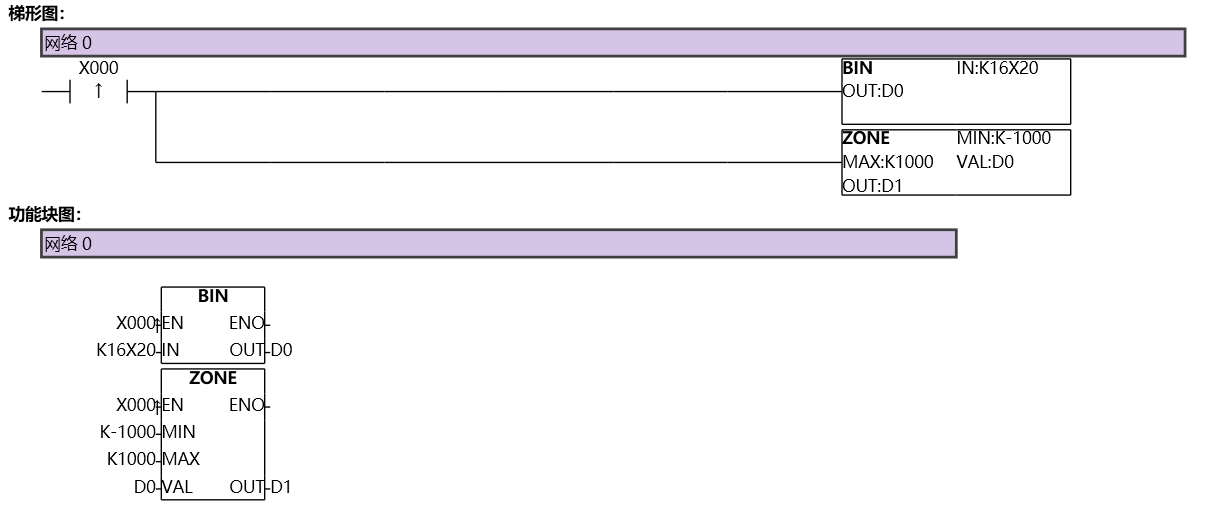
图2 ZONE
1.4. Action#
When D0<0, the value of D0+(-1000) is saved in D1.
When D0=0, save 0 in D1.
When D0>0, the value of D0+1000 is saved in D1.
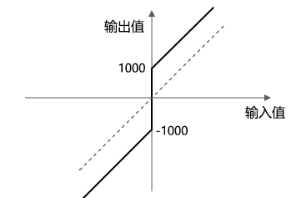
图3 Action
อ่านเพิ่มเติม

