


1. Weekly Window Judgment WKZCP
ในหน้านี้4 หัวข้อ
1.1. Instruction Description#
The instruction will read the current time from the hardware clock and compare it with the given time window (a time period consisting of start and end times), and store the comparison results of each situation in the specified bit register group.
Only comparing weeks/hours/minutes/seconds, the calendar section will be ignored.
Assuming to output to Y000, Y001, Y002, Y000=1 when the current time does not enter the time window, Y001=1 when entering the time window, and Y002=1 when exceeding the time window.
For example, on Tuesday, June 26, 2018 at 09:50:30, when the time window is [Monday 09:00:00, Wednesday 10:00:00], it is in the time window. When the time window is [Sunday 08:00:00, Tuesday 09:00:00], it exceeds the time window. When the time window is [Tuesday 10:00:00, Thursday 11:00:00], it does not enter the time window.
1.1.1. There are the following precautions:#
If BCD format is selected in [PLC Settings]=>[Other]=>[Real time Clock Format], all date and time values must be encoded in BCD format (for example, 8211 represents 2013). Please refer to the table below.
The time format used is a complete 8-character time format, and the address of the year must be included in the parameter. Even if the year, month, and day will not participate in the execution.
Sunday (0) is smaller than Saturday (6).
The start time must not exceed the end time, and time windows like [Saturday 23:59:59 Sunday 00:00:00] are illegal.
Our HMI+PLC All-in-one could not use the function below
| T (Dn-Dn+7) | Description | Data |
|---|---|---|
| 0 | Year (2000-2099) | Current Year |
| 1 | Month (1-12) | Current month |
| 2 | Date (1-31) | Current Date |
| 3 | Hour (0-23) | Current Hour |
| 4 | Minutes (0-59) | Current minute |
| 5 | seconds (0-59) | current second |
| 6 | 00 | Reserved |
| 7 | What day of the week (0-6) | The current day of the week, 0=Sunday |
1.2. The valid operands of the instruction#
| Input/Output | Data Type | operand | Description |
|---|---|---|---|
| T0 | 16 bit integer | D | minimum |
| T1 | 16 bit integer | D | Maximum |
| OUT | ON/OFF | Y/M/S, Word positioning (D/V/Z) | Result |
1.3. Example#
Command table
NETWORK 000
LD X000
WKZCP D0 D10 Y0 // Starting from the time data stored in D3~D7 and ending from D13~D17, output the comparison results to Y000, Y001, Y002.
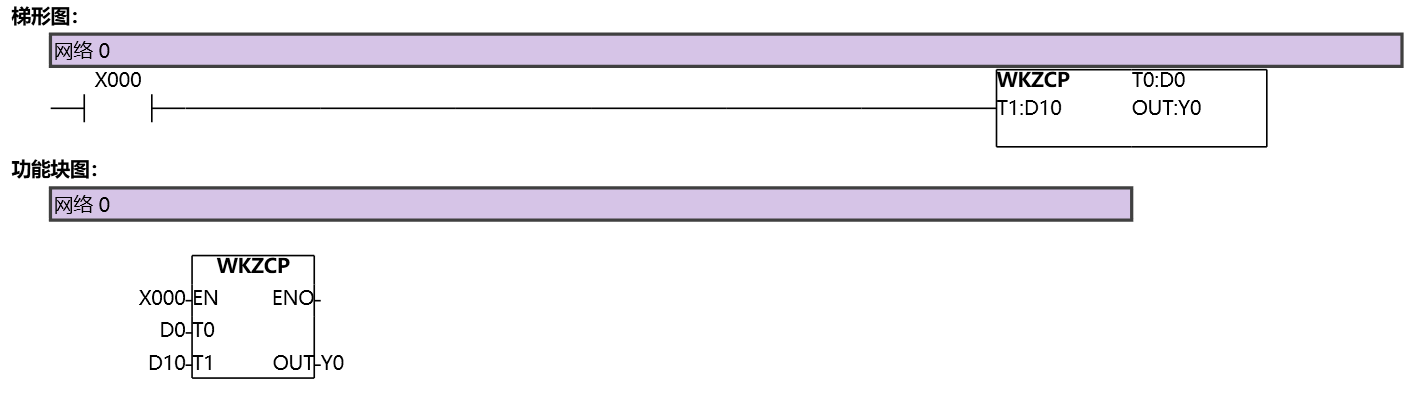
图1 WKZCP
อ่านเพิ่มเติม

