


1. Convert a string to a floating number S_R
ในหน้านี้5 หัวข้อ
1.1. Instruction Description#
Convert the input string starting from the address (IN) to the floating point register (OUT) by taking the substring starting from the (IDX) th byte.
The format of a string can be [0 or any number of spaces] [+or -] [digits 0-9], or [0 or any number of spaces] [+or -] [digits 0-9] [. or,] [digits 0-9].
The INDX value is usually set to 1, and the conversion starts from the first character of the string. The INDX value can be set to other values to start the conversion at different points in the string. This method can be used when the input string contains text that is not part of the number to be converted. For example, if the input string is "Temperature: 77.8", INDX can be set to 13 to skip the word "Temperature:" at the beginning of the string.
The instruction to convert substrings to real numbers does not convert strings that represent real numbers in scientific notation or exponential form. This instruction will not generate overflow errors (M8169), but will convert the string to a real number before the exponent and then terminate the conversion. For example, the string "1.234E6" will be converted to a real number value of 1.234 without any errors.
When reaching the end of the string or encountering the first invalid character, the conversion will terminate. Invalid characters are non numeric (0-9) characters or one of the following characters: plus sign (+), minus sign (-), comma (,), or period (.).
When the input string does not contain valid values and cannot be converted, it will also set overflow errors (SM1.1). For example, if the input string contains "A123", the conversion instruction will set SM1.1 (overflow) and the output value will remain unchanged.
1.2. Examples of valid and invalid input strings#
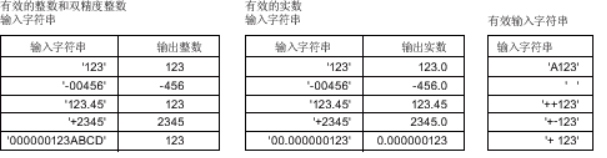
图1 Examples of valid and invalid input strings
1.3. Attention#
a) The encoding of the string is ASCII (ISO/IEC 646), please do not use other encoding methods such as UTF-8, Unicode, etc.
b) The real number format used by the CPU supports up to 7 significant digits. Attempting to display 7 or more significant digits will result in rounding errors.
1.4. The valid operands of the instruction#
| Input/Output | Data Type | operand | Description |
|---|---|---|---|
| IN | 16 bit integer | D/CV/TV/AI/AO/K/H/V/Z/FD, bit composite word (X/Y/M/C/T/S), local variable (LW) | Input |
| IDX | 16 bit integer | D/CV/TV/AI/AO/K/H/V/Z/FD, bit composite word (X/Y/M/C/T/S), local variable (LW) | ID |
| OUT | 32-bit real number | D/CV/TV/AO/V/Z, bit composite word (Y/M/C/T/S), local variable (LW) | output |
1.5. Example#
Command table
NETWORK 000
LDP X000//String operations are time-consuming, so try to use edge conditions to trigger them.
Convert strings starting with D0 to floating-point number D100
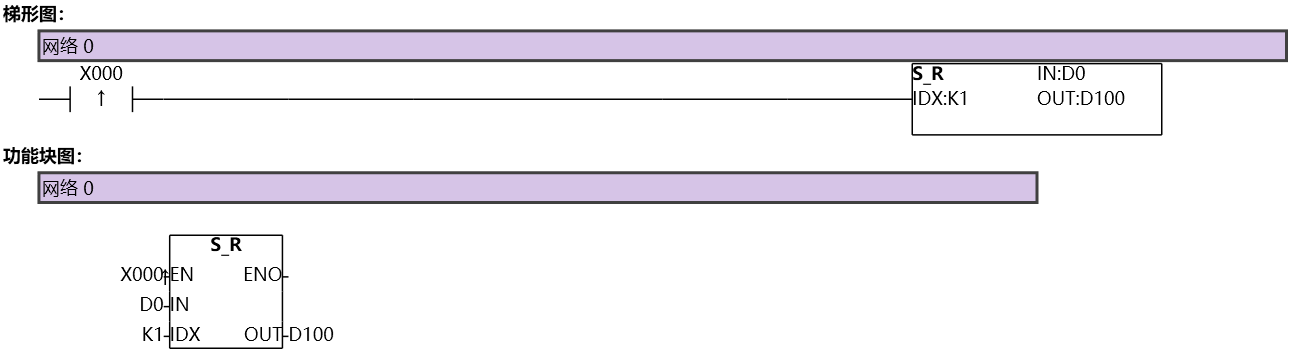
图2 SR
อ่านเพิ่มเติม

