


1. Network annotation
To turn on or off network comments, click the Network Comments button in the Comments area of the View menu ribbon.
1.1. Edit comments#
Enter or edit network comments in the area adjacent to the top of the network.<% AppName%>will initially display the default comment, which can be replaced.
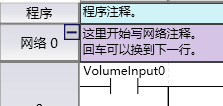
图1 Network Comment
There is no limit to the length of network annotations, it is recommended to keep them as short as possible.
อ่านเพิ่มเติม
อุปกรณ์ที่ใช้กับคู่มือนี้
2 รายการ

