


1. Program Annotations
To turn on or off program comments, click the "Program Comments" button in the "Comments" area of the "View" menu ribbon.
1.1. Edit comments#
Enter or edit program comments in the area above Network 1.<% AppName%>initially displays default comments, which can be replaced.
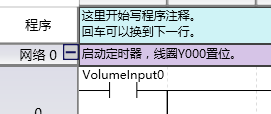
图1 Program Comment
There is no limit to the length of program comments, it is recommended to keep them as short as possible.
Program comments are optional, always visible at the top of the program and displayed before the first network.
อ่านเพิ่มเติม
อุปกรณ์ที่ใช้กับคู่มือนี้
2 รายการ

