


1. Set PLC protection password
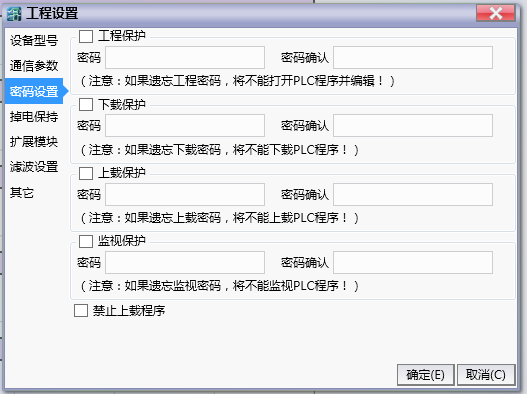
图1 Set PLC protection password
Engineering Encryption:Set the engineering password for the PLC program. When opening the program, it will prompt for the password. Forgetting the password will cause the program to fail to open.
Upload Encryption:Set the upload password for the PLC program. When uploading the program, you will be prompted to enter the password. Forgetting the password will cause the program to fail to upload.
Download Encryption:Set the download password for the PLC program. When downloading the program, you will be prompted to enter the password. Forgetting the password will result in the inability to update the internal program of the PLC.
Monitoring encryption:Set the password for PLC monitoring, which will be used when monitoring this mode on the upper ladder diagram. Forgetting this password will prevent monitoring of the PLC program.
Attention:
The password must start with a letter or number and be between 4 and 12 digits in length.
อ่านเพิ่มเติม

