


1. Add or remove additional inputs
1.1. Add input#
To add additional input to the AND or OR instruction, follow these steps:
- Move the mouse to the input parameter side (an indicator box appears on the parameter side).
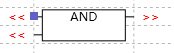
- Right click on the mouse to open the dropdown menu.
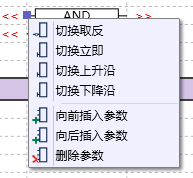
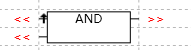
- Click on 'Insert argument before' or 'Insert argument after' to insert the new parameter to the front or back.
1.2. Remove input#
To remove input from an AND or OR instruction, follow these steps:
- Move the mouse to the input parameter side (an indicator box appears on the parameter side).
- Right click on the mouse to open the dropdown menu.
- Click 'Remove argument' to remove the current parameter.
อ่านเพิ่มเติม
อุปกรณ์ที่ใช้กับคู่มือนี้
2 รายการ

