


1. FBD instruction selector
ในหน้านี้3 หัวข้อ
Open the instruction selector by following one of the following steps:
Double click on the selection area of the FBD editor.
Select the selection area of the FBD editor and press Enter.
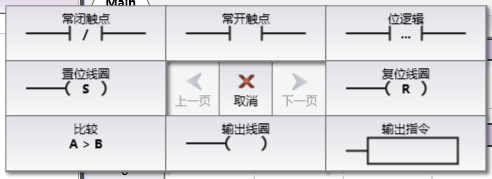
图1 instruction seletor
| Button | Execute Operation |
|---|---|
| Previous Page | Enter the previous page of available groups for selection. |
| Next Page | Enter the next page of available groups for selection. |
| Cancel | Exit command selector. |
| Return | Return to the previous selection group of the instruction selector. |
| Result Rising Edge | Insert a Result Rising Edge (MEP) instruction. |
| And insert an AND command with | . |
| Result Descending Edge | Insert a Result Descending Edge (MEF) instruction. |
| Set Coil | Insert a Set Coil (SET) command. |
| Reset coil | Insert a reset coil (RST) command. |
| Compare | Enter the selection of comparison commands. |
| OR or | Insert an OR instruction. |
| Output Instruction | Enter the category selection of output instructions. |
1.1. Comparison of instruction selection#
After clicking the "Compare" button, enter the selection of comparison commands. Click on one of them to complete the insertion of the corresponding instruction.

图2 Comparison Instruction Selection
1.2. Category selection of output instructions (boxes)#
After clicking the "Output Instruction" button, you need to further select the instruction category. Click on one of the categories to access all instructions within that category.

图3 Category Selection
Assuming that 'logical operation' is clicked here, only the instructions for logical operation will be displayed next.

图4 Logical Operation Instruction Selection
1.3. Keyboard operation#
After pressing the directional keys, a cursor will appear in the corresponding direction at the center. Press the directional keys again to move the cursor.
The cursor cannot be moved to the center button. Press the directional key on the left to flip to the previous page, and press the directional key on the right to flip to the next page.
Press the Enter key to select this button, and press the Esc key to exit the instruction selector.
อ่านเพิ่มเติม

