


1. Insertion and Coverage Mode
1.1. Switch editing mode#
Our software allows you to switch between two editing modes by pressing the ENTER key on the keyboard:
**Coverage mode (default): * * If an instruction is placed on top of another instruction, the program editor deletes the existing instruction and replaces it with a new instruction.
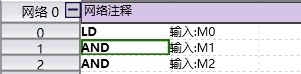
图1 Coverage mode cursor
insert mode: If an instruction is placed on top of another instruction, the program editor moves the existing instruction to make room for the new instruction.
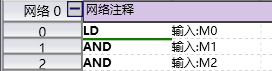
图2 Insert mode cursor
อ่านเพิ่มเติม
อุปกรณ์ที่ใช้กับคู่มือนี้
2 รายการ

