


Chapter 4 — Keyboard Operation
4.1 Keyboard Introduction#
The keyboard of the SK300 series VFD consists of four parts: a multifunctional display digital tube, six buttons, and one rotary encoder. Users can complete functions such as startup,stop,status monitoring, fault inquiry, parameter modification, and speed regulation through the keyboard. The appearance of the keyboard is shown in image 4-1:
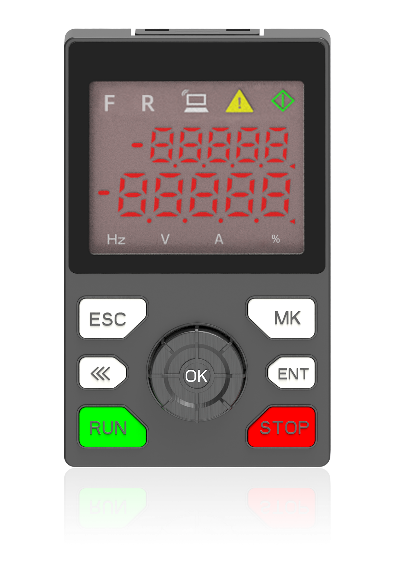
keyboard is suitable for all models
image 4-1
Description of the functions of each part of the keyboard
button | name | function |
|---|---|---|
ESC | return | Return to the previous state or cancel the current parameter modification |
ENT | confirm | Enter the parameter menu or confirm the current parameter modification |
<< | Left shift | data switching, data left shift |
MK | Multiple function | Multifunctional buttons that can be set to invalid, jog, forward or reverse |
RUN | run | Run Command |
STOP | stop | Stop command, or fault reset |
Knob | UP/DN | Parameter UP/DN setting knob |
Indicator | status | function |
|---|---|---|
F | bright | The current operating frequency direction is forward rotation |
R | bright | The current operating frequency direction is reverse rotation |
| Off/On/Flashing | Off: Keyboard control command is valid On: External terminal command is valid Flash: RS485 control command valid |
| Bright/Flashing | On: Currently in a faulty state Flash: Currently in motor parameter self-learning state |
| Bright/Flashing | On: Currently in the output state of the VFD running Flash: Currently in the deceleration and slowdown state of VFD |
Hz | bright | display parameter unit is Hz |
V | bright | display parameter unit is V |
A | bright | display parameter unit is A |
% | bright | display parameter unit is% |


อ่านเพิ่มเติม
