


Time Display
The control of
Time Display is mainly used to display the system time. Click on the control
icon , then it
will appear a dialog box as shown in Figure 4-105.
, then it
will appear a dialog box as shown in Figure 4-105.
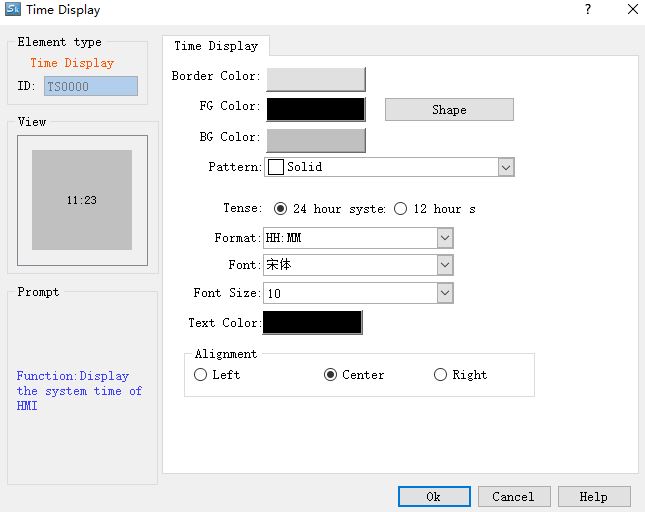
Figure 4-105 Time Display dialog box

Note: Refer to Bit Button control for Shape, Border color, Foreground color, Background color and Pattern.
Ø Format: Fours modes of time display for users to choose.
HH:MM Hour: Minute
HH:MM:SS Hour: Minute: Second
HH-MM-SS Hour- Minute-Second
HH-MM Hour- Minute
Ø Font: Font type of text
Ø Font Size: Decide the font size of time display
Ø Color: Decide the text color of time display
Ø Alignment: Decide the position of time display, left, center or right.
After the settings, click "OK" to add the control to the view area (the screen)
อ่านเพิ่มเติม

