


File Encryption
Whether a password is necessary to open the project file.
Double click the "File Encryption" option in the “Project Manager", as shown in Figure 7-12 pop-up dialog box:
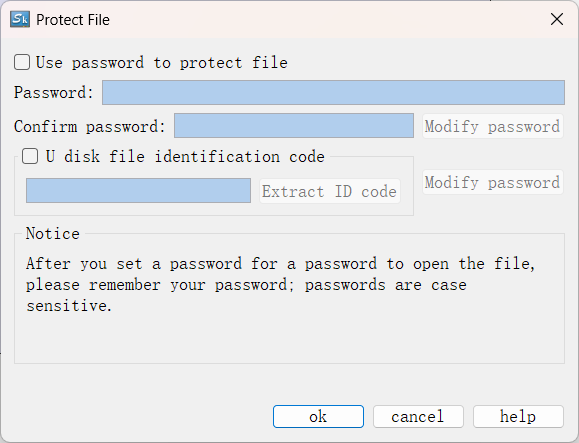
Figure 7-12 File Encryption dialog box
Select the "Use password to protect file" in the above dialog box; enter in the Password and Confirm Password; click "OK" to complete.
In this case, if user reopens the project, a password input box will be displayed as shown in Figure 7-13:
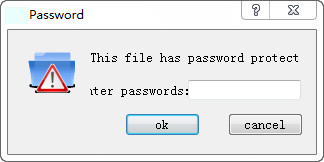
Figure 7-13 Password input box
Users need to input secret to open project.
l U disk file identification code: Generate an identification code file based on the entered identification code to provide additional protection for the extracted USB files. Only HMI configured with the corresponding matching identification code can update the configuration file.
Implementation principle: After checking the "U disk file identification code", the configuration file will be encrypted. It is necessary to burn the extracted identification code file into the HMI. Only when the identification code of the HMI matches the configuration identification code set by the upper-level configuration can the configuration be decrypted, and the configuration can be successfully updated.
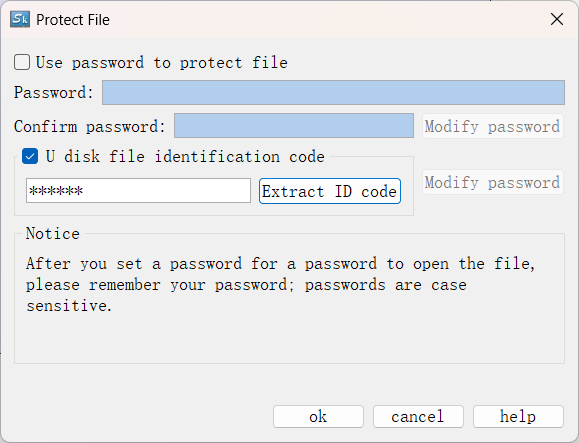
Operation Steps:
(1) Check the "U disk file identification code" option, enter the password in the input box, click "Extract ID code", and select a path to generate the file "skconfigkey.bin".
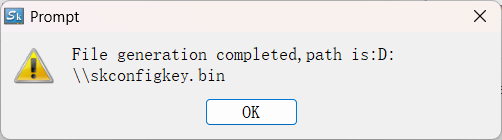
(2) Copy the above file to the root directory of the USB disk, insert it into the running HMI, and click update to successfully burn the identification code into HMI.(The first update of the identification code on the HMI does not require authentication. For subsequent updates (starting from the second time), the current identification code must be correctly entered to proceed. If you need to clear the HMI's identification code, empty the contents of the "skconfigkey.bin" file and then update the HMI with this empty identification code file.)
(3) Finally, download the configuration with the matched USB disk file identification code to the HMI via the USB disk configuration file or download cable.
Note: The touch screen with the identification code burned can still normally update configurations that do not have the USB disk file identification code option enabled. The purpose of this function is to restrict the use of specific configurations.