


Clock
Clock setting includes three functions: downloading system time to HMI, writing time to PLC and synchronization with PLC.
Double click “Clock” in the Project Manager to open the attribute setting box of Clock.
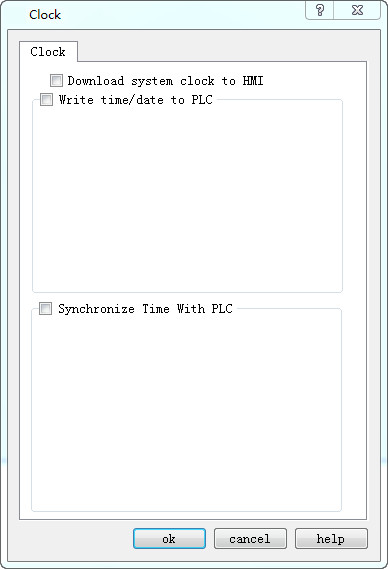
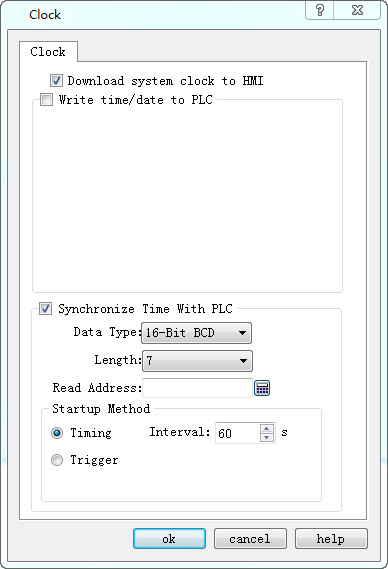
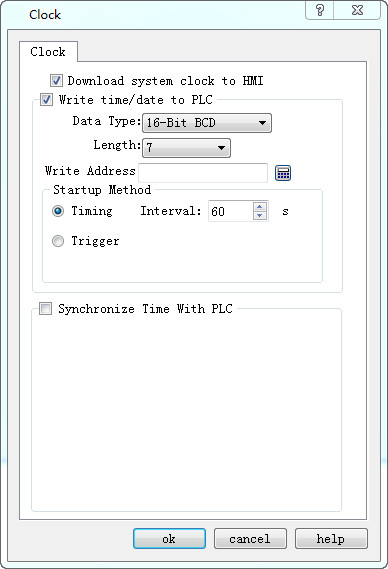
Figure 7-11 Clock Setting dialog box
Download system clock to HMI: Whether to download the system clock information to HMI.
l Write time/date to PLC:
l The Data type and Length are default values.
l Time: Year-Month-Day-Hour-Minute-Second-Week. Refer to LW 60000~LW 60006 in Register Address for detailed information. It cannot modify the Week in the system time.
Write address: The system time information will be written into this PLC address.
l Startup Method:
Timing: Write the system time information into the specified PLC address periodically at specified time internal.
Trigger: The system time information will be written into the specified PLC address when the trigger address is 1.
Auto Reset: Reset automatically the trigger address to 0 when it is 1.
Synchronization with PLC time:
The Data type and Length are default values.
Time: Year-Month-Day-Hour-Minute-Second-Week. Refer to LW 60000~LW 60006 in Register Address for detailed information. It cannot modify the Week in the system time.
l Read address: The information in the PLC address will be read.
l Startup Method:
Timing: Write the system time information into the specified PLC address periodically at specified time internal.
Trigger: The system time information will be synchronized with the PLC when the trigger address is 1.
Auto Reset: Reset automatically the trigger address to 0 when it is 1.
อ่านเพิ่มเติม

