


1. Single step debugging
A Step System can track the process of program execution step by step, zooming in on details to make it easier to identify program issues.
Single step operation can only be used in the "pause" state, and can be performed through the simulation control bar.
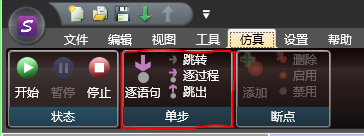
图1 Simulation Single Step
(1) Process by process
In&# 34; Pause&# 34; After performing a single step operation "process by process" in the state, it will jump to the next instruction and continue to pause, during which only one instruction is run. Note that 'step-by-step' will skip calls to subroutines and function blocks.
(2) Sentence by sentence
In&# 34; Pause&# 34; After performing a single step operation "process by process" in the state, it will jump to the next instruction and continue to pause. If you want to call subroutines and function blocks, it will jump to the calling location.
(3) Jump out
When calling a subroutine or function block, after performing a single step operation to "jump out", the program will complete the remaining part of the subroutine or function block, jump to the next instruction at the calling position, and continue to pause. If this operation is executed in the main program, it will leave the "pause" state and continue to execute.
(4) Jump to
The interface will navigate to the current paused position for easy viewing.
อ่านเพิ่มเติม

