


EditView
Created for the HMI of Samkoon SK series from Shenzhen Samkoon Technology Corporation Ltd. SKTOOL configuration software is a development system with an integrated development environment and abundant, advanced functions. Taking advantage of the Windows system, it shows its simplicity and good interface consistency. The menu Layout close to that of Windows operating, it is facile to learn and apply, thus engineers can easily develop their proper projects for the configuration used in the SKTOOL. Development interface and functional areas are as shown in Figure 2-27:
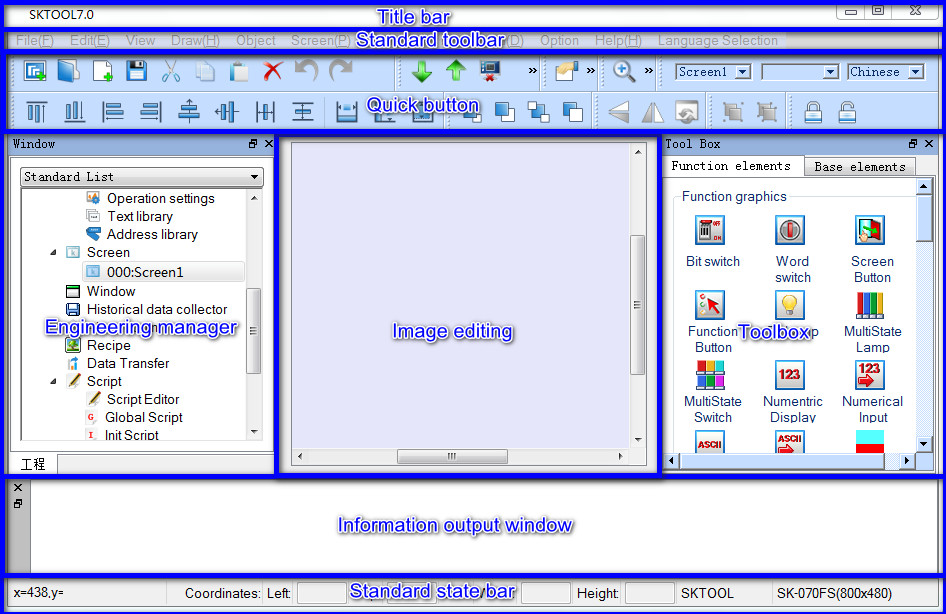
Figure 2-27 Interface and areas of the software
l Title Bar: Display the name of SKTOOL version.
l Menu Bar: Show various command menus of SKTOOL that are all drop-down menu.
l Standard Toolbar: Shortcuts to commands button; Display file; open project; new project; restoration and other function buttons.
l Toolbox: Basic configuration controls designed for engineers to configure; contain function controls and basic controls.
l Picture area window: Window for engineering staff to configure, edit graphic object.
l Project Manager: Communication connections, parameter settings, picture management, alarm settings, set formula and tree-form menu set by historical data collector.
l Information output window: Prompts concerning information input, output, error messages and other tips as engineers conduct configuration editing and compiling.
l Standard Status Bar: The current state of configuration, including the mouse coordinate, the control type, the control coordinate, the control size, etc..
อ่านเพิ่มเติม

