


1. Mechanical cam CAM
ในหน้านี้3 หัวข้อ
1.1. Instruction Description#
Only FGm series PLCs have this function;
This instruction must be used in conjunction with the enhanced high-speed counting instruction EHCNT. When used alone, the high-speed counter value will not change.
1.2. Instructions for use#
For example, as shown in the figure below, CAM must first be used in conjunction with EHCNT;
Set the EHCNT command, which can select any counting mode of any high-speed counter, but its triggering method must be selected as' cam triggering ', and the enable of EHCNT must be more advanced than CAM pilot;
The counter selection in the CAM instruction must be the same as the setting in EHCNT, which is CV235 in this example;
The maximum target value is set according to user needs, and the CV235 value will cycle between 0 and the maximum target value. When CV235 reaches the maximum target value, it will automatically reset and continue counting to the maximum target value;
The D register for the number of turns stores the number of times the high-speed counter value crosses the maximum target value in the forward direction, which is used to calculate the total value of the counter. In this example, the number of turns is stored in D100 (D101);
- Right click on the blank space in the middle of the CAM parameter setting window to add the middle target value, as well as the operation address and method. The intermediate target value should be set between 0 and the maximum target value, which can be equal to 0 and the maximum target value. Setting an intermediate target value that exceeds the maximum target value will be treated as the maximum target value. The operation address can be set as Y output or M register, and different Y and M can be set with the same intermediate target value. The intermediate target values do not need to be arranged in order of size, and the operation mode can be set or reset according to user needs.

图1 CAM LAD Example
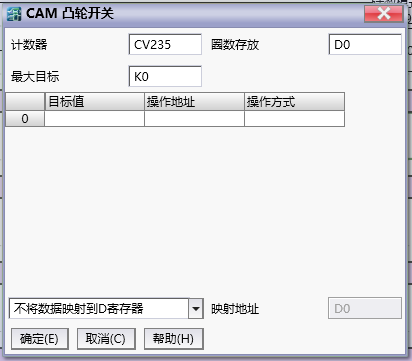
图2 CAM set window
- The above all use the 'do not map data to D register' mode, and the operation address and method of the intermediate target value cannot be modified online. When it is necessary to change the target value and operation address method online, the 'only D control' mode can be selected and the controlled mapping address can be selected. When selecting this mode, the intermediate target value set in the setting window is invalid, and the corresponding operation is only performed through the parameters in the D register. The storage format of the data in the D register is shown in the following figure. Among them, the intermediate target value is a double word positive integer, with operation type written as 0 indicating operation on the M register, and operation type written as 1 indicating operation on the Y output port. For example, if the operation type is written as 1 and the operand offset is written as 10, it indicates operation Y10. The reset operation is represented by writing 1 or 0 respectively. Note that the final end must be marked with an end flag. Adding a double-1 at the end of the last operation indicates the end. If there is no end flag, the PLC will report an error.
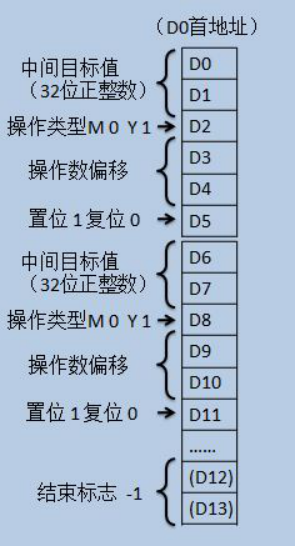
图3 CAM‘仅D控制’数据存放规则
1.3. Attention#
CAM instructions need to be used in conjunction with EHCNT, and EHCNT needs to be set to cam triggered;
The activation of EHCNT must be conducted before CAM;
The maximum target value and intermediate target value cannot be set to negative numbers, and passing through the intermediate target value in the negative direction during the counting process will not trigger the corresponding action, that is, the cam is triggered unidirectionally;
When operating on Y, the operation is executed immediately. In the above example, when CV235 passes 1000 forward, Y34 is immediately set, and this setting action is not affected by the scanning cycle;
- Do not operate on a maximum of 200 intermediate target values;
When using only D register control, a 32-bit -1 must be used as the end flag.
อ่านเพิ่มเติม

