


Free Line
Select the Free Line command in the Draw menu or click
the Free Line
command button  in the toolbar. Move the mouse to
the Edit window and the cursor
will change to a cross shape so now you can draw a free line in the Edit window.
in the toolbar. Move the mouse to
the Edit window and the cursor
will change to a cross shape so now you can draw a free line in the Edit window.
Move the mouse to a position where you want to free line; click the left mouse button, and a small green dot will appear in the editing window, which is the starting position of the free line.
Move the mouse to other positions in the screen, and then the system will automatically draw a free line following the trajectory of the mouse movement; click the left mouse button or right button to complete drawing the free line. As shown in Figure 4-28:

Figure4-28 Free Line Operation
After the above steps, the
transparency, line type, line width, line color, end arrow and end point shape
of the free curve will be set by the system default. The engineer can modify
these attributes to meet the needs of the project: Move the cursor to the free
curve, double-click the left button; or select the free curve first, and then
click the toolbar property button , a dialog box same as that of Line
Property will pop up.
, a dialog box same as that of Line
Property will pop up.
In this case, you can adjust the properties of the free curve through the pull-down and fine-tune buttons. The SKTOOL configuration software provides up to 6 straight line types, 30 kinds of line width and 6 types of straight-line end arrows for curves / arcs.
Dynamic Color
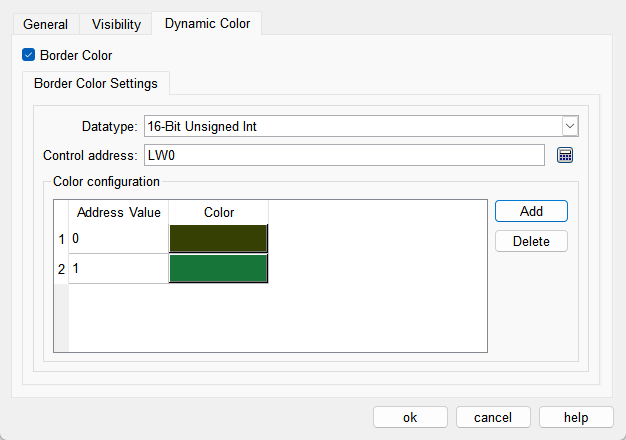
The color of border can be changed by modifying the values of the corresponding registers. You need to check the corresponding option to enable the dynamic color function.
l Data Type: Set the data type of the register.
l Control Address: Set the address of the register that controls color changes.
l Color Configuration: Multiple values and their corresponding colors can be configured. When the value of the register corresponding to the control address matches one of the configured values, the corresponding color will be displayed. (If the register value does not match any of the configured values, the color set in the configuration will be displayed.)