


Table
Select the Table
command in the Draw menu or the left click the command button in the
toolbar, then it will appear a pop-up table dialog box, as shown in Figure
4-39:
in the
toolbar, then it will appear a pop-up table dialog box, as shown in Figure
4-39:
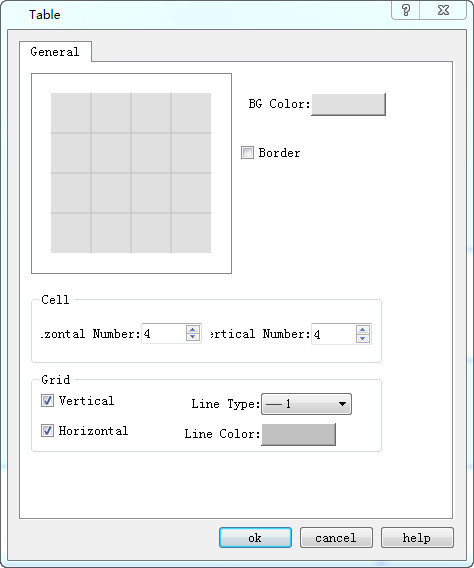
Figure 4-39 table dialog box
In the above dialog box of the above diagram, SKTOOL configuration software provides choices of the Background Color, Border, Grid and Grid lines. You can decide whether to display vertical or horizontal grid lines in the Grid option, and the type and color of lines are changeable.

The table is just a graphic object, which means you cannot add text, data or other embedded objects to the table. The table can only be displayed as a chassis image. To display text, data, and other objects on a table, you can use Text and numeric display objects to overlay the table and set it to the top layer.
อ่านเพิ่มเติม

