


Window
Way to add a new window is similar to that to create a new screen. Refer to screen operations for the open, delete, copy or properties of window. The Properties dialog box of the window is shown in Figure 7-18.
Open a window in screen, and a window will display in the screen.
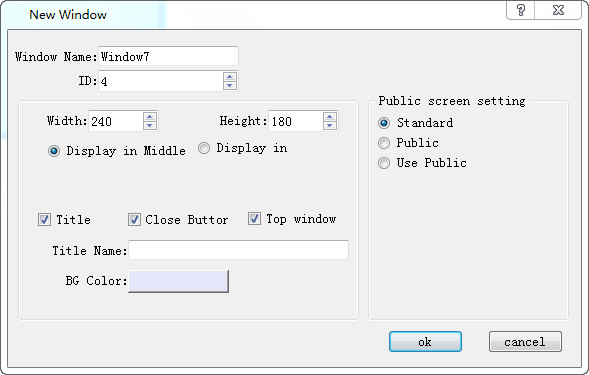
Figure 7-18 Window Properties dialog box
l Height, Width: Set the height and width of the window respectively.
l Display in Middle: When the window pops up, it is displayed in the center of the HMI.
l Display in: Set the X-coordinate and Y-coordinate point on which to display the window. The origin of coordinates is the top left corner of the HMI screen.
l Title: Enter the title name that will pop up as a title bar with the window.
l Close Button: Whether the window has a close button.
l Top window:Whether lock other screen and window when this window opening.
l Background Color: Set the background color of the window.
l Standard:Not as a public window ,and not use public window.
l Public: show the window’s all objects on the windows that select “use public”.
l Use Public:The window can show the “Public”window’s all objects and controls.
อ่านเพิ่มเติม

