


The operation setting
Configuration operation Settings:
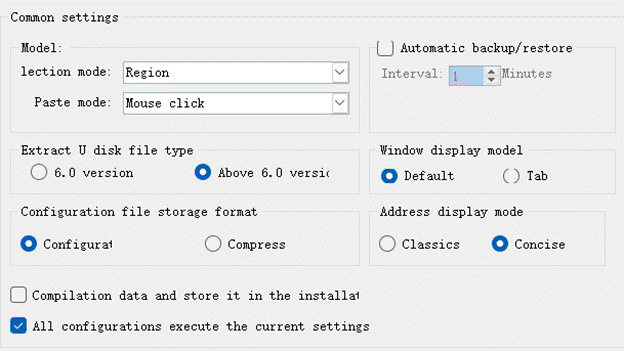
Ø choice model
regional choice: when the mouse choose regional section contains selected area can be selected to the control
controls selection: when the mouse choose region completely completely contains selected control can be selected to the control
Ø paste mode
mouse click paste: copy control, click paste the user to choose paste placed control
same position paste: copy control, click paste, paste controls in place to be copied controls peripheral location
Ø extract U disk file type
Version 6.0: generate version 6.0 U disk file
is higher than version 6.0: generate higher than version 6.0 U disk file
Ø Configuration backup
Backup interval: the time interval for automatically backing up the current configuration file
Ø screen display mode
Default: Consistent with the screen display mode of the old version software
Tab page: Similar to the display mode of a browser page, you can switch and close the display of the screen by switching and closing the page
Ø Configuration file storage method
Configuration format: stored in .skm format when saving
Compress format: stored in .skr format when saving
Ø Address Label Display Mode
Classic: Consistent behavior with older versions of software
Concise: list only the address of the control
Ø The compiled data is stored in the software installation directory
After checking, the compiled data will be stored in the software installation directory, otherwise it will behave the same as the old version of the software
Ø All configurations execute current settings
After checking, the above settings are valid for all configurations, otherwise only the current configuration is valid
อ่านเพิ่มเติม

