


1. Subroutine parameter table
ในหน้านี้5 หัวข้อ
1.1. 1. definition#
Provide software components as parameters to the ladder diagram program for use. Programmers can use program parameters as software components in this program, without worrying about specific software component types and addresses.
1.2. 2. attribute#
A software component parameter consists of [number], [name], [read-write permission], [data type], [array length], and [comment].
| Attribute | Function |
|---|---|
| Number | What is the position of this parameter among all parameters in the program. |
| Name | The name of a program parameter, used only in the program to uniquely identify this parameter. |
| Read/write permission | Declare whether this parameter can be read or written in the program. Divided into three permissions: read-only (IN), write only (OUT), and read-write (INOUT). |
| Data Type | The data types of program parameters are divided into four types: BOOL (bit), WORD (single word), WORD (double word), and FLOAT (floating point). |
| Array length | Allocate array length based on data type. If ARRAY OF XXXX data type is selected, custom editing of array length is allowed. Otherwise, it defaults to 1. |
| Annotations | Annotations for program parameters that can provide detailed explanations of the parameter. |
a) The parameter numbers must start from 0 and go down sequentially, for example, 0, 1, 2, 3.
b) The name of the parameter can be in English and numbers, as well as the underscore '_'. Parameter names can be in Chinese.
1.3. 3. Usage operation#
(1) Open the program parameter editing window
Click on the top menu bar 【 View 】 - 【 Open Variable Table Window 】 to open the editing window.
(2) Create or edit program parameters
Click the add button in the program parameter editing window to create a new program parameter. You can edit the properties of program parameters in the table below.
(3) Delete program parameters
Select the parameter to be deleted in the table, click the delete button, and the selected parameter will be deleted.
In the case of deletion, all parameter numbers below will be reduced by one.
(4) Move program parameters up or down
Select the parameter to be moved in the table, click the up or down button, and the selected parameter will be moved up or down.
When moving upwards, subtract one from the number of this parameter and add one to the number of the parameter above, and swap the positions of these two parameters. Similarly, when moving downwards.
(5) Call program parameters in the program
Just like software components and local variables, simply enter the name. For example, the single character read-only parameter ARG0 and the single character only write parameter ARG1 are defined. Inputting MOV ARG0 ARG1 means reading data from ARG0 and writing it into ARG1.
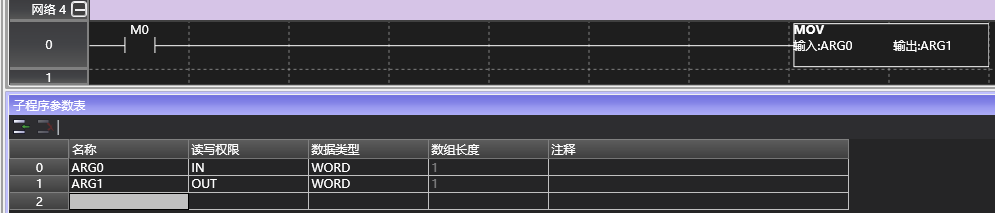
(6) Call this parameterized program elsewhere
Call subroutines, including CALL instruction call subroutines, ATC instruction bound interrupt subroutines, and HSCS instruction bound interrupt subroutines. No matter how a subroutine is called, as long as it has program parameters, software components must be specified for each parameter at the place of call.
Taking the above figure as an example, the subroutine defines two parameters ARG0 and ARG1. As long as this subroutine is called, the software component login for the parameters must be completed in the editing window.

Log K10 into ARG0 and D10 into ARG1, so that when executing this subroutine, the value of ARG0 is 10. After executing this subroutine, the value of ARG1 will be output to D10.
Special software components such as index software components, bit synthesis words, word positioning, local variables, and current program parameters can also be registered in the program parameters. However, there are certain usage restrictions based on the data type and read-write permissions of program parameters.
| Read and write permissions | Data type | Array length | Software component limitations |
|---|---|---|---|
| Read only (IN) | BOOL | 1/Custom | You can use X/Y/S/M/C/T bit soft components, D/V/Z word bits, bit local variables (LBxxx), and the read-only (IN)/read-write (INOUT) bit parameters of the current program. |
| Write Only (OUT)/Read Write (INOUT) | BOOL | 1/Custom | You can use Y/S/M/C/T bit soft components, D/V/Z word bits, bit local variables (LBxxx), and write Only (OUT)/Read Write (INOUT) bit parameters for the current program. |
| Read only (IN) | WORLD | 1/Custom | Can use K/H constants, D/CV/TV/AI/AO/V/Z word software components, X/Y/S/M/C/T bit synthesis single characters, single character local variables (LWxxx), and single character parameters for read-only (IN)/read-write (INOUT) of the current program. |
| Write Only (OUT)/Read Write (INOUT) | WORLD | 1/Custom | You can use D/CV/TV/AO/V/Z word software components, Y/S/M/C/T bit synthesis single characters, single character local variables (LWxxx), and the current program's Write Only (OUT)/Read Write (INOUT) single character parameters. |
| Read only (IN) | DWORD | 1/Custom | Can use K/H constants, D/CV doubleword soft components, X/Y/S/M/C/T bit synthesis doubleword, doubleword local variables (LDxxx), and doubleword parameters for read-only (IN)/read-write (INOUT) of the current program. |
| Write Only (OUT)/Read Write (INOUT) | DWORD | 1/Custom | Dual word software components for D/CV, bit synthesis for Y/S/M/C/T, dual word local variables (LDxxx), and dual word parameters for write only (OUT)/read write (INOUT) of the current program can be used. |
| Read only (IN) | FLOAT | 1/Custom | You can use K constants, D floating-point soft components, floating-point local variables (LFxxx), and read-only (IN)/read-write (OUT) floating-point parameters for the current program. |
| Write Only (OUT)/Read Write (INOUT) | FLOAT | 1/Custom | D's floating-point software components, floating-point local variables (LFxxx), and floating-point parameters for write only (OUT)/read write (INOUT) of the current program can be used. |
1.4. 4. Execute Logic#
When executing a subroutine with parameters, it is divided into the following steps.
a) Before executing the subroutine, write the software components into read-only/read-write parameters.
b) Call this program. Note that throughout the entire execution cycle of this program, the program only processes its own program parameters, which are temporarily independent of the software components. Changing the data of the software component will not affect the corresponding parameters, and changing the parameter data will not affect the software component either.
c) After executing the subroutine, write the write/read-write parameters back to the software component
1.5. 5. Special occasions#
**a) Specify the timer (TON, TOF, TONR) with program parameters. * * At this time, this parameter can only be used with TV.
b) Use program parameters to specify counters (CTU, CTD, CTUD). At this point, only CV can be used for this parameter Instructions related to high count counters cannot use program parameters**
c) In the above usage scenarios, any modifications to parameters will immediately take effect on the source software component.

อ่านเพิ่มเติม

