


1. Insert a jump
Insert a jump by following one of the following steps:
Click on the toolbar at the top of the SFC editor
。
Double click on the grid area where you want to insert the component and click on it in the button group
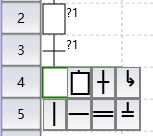
- Press the F5 hot key。

The inserted jump will carry a status number for the jump to
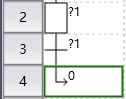
图1 insert a new status
Click on this identification number to modify.
อ่านเพิ่มเติม
อุปกรณ์ที่ใช้กับคู่มือนี้
2 รายการ

