


1. Insert a transfer
Insert a transfer by following steps:
Click on the toolbar at the top of the SFC editor
按钮。
Double click on the grid area where you want to insert the component and click on it in the button group
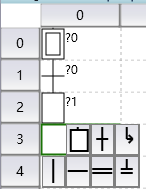
- press F3 hot key。

The inserted transfer will initially be assigned an identification number, which uniquely corresponds to a transfer.
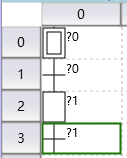
图1 the status of new insert
Click on this identification number to modify it。
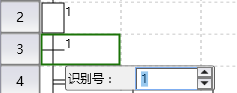
图2 modify identify number
อ่านเพิ่มเติม
อุปกรณ์ที่ใช้กับคู่มือนี้
2 รายการ

