


1. Monitor status using a program editor
ในหน้านี้5 หัวข้อ
To read PLC data and display it in the program editor, click the toolbar button or“tool”(Tool) Menu bar“monitor”(Monitor) button
 ,start communication with the PLC and enter the monitoring PLC state.
In monitoring mode, click this button again to stop monitoring and return to editable mode.
2. Monitoring of ladder diagram program#
The following shows the monitoring status in the ladder diagram program editor. Following the execution of the program, the program editor reads the visible operand data from the PLC and displays it in the editor.

图1 LAD program monitor
3. Monitoring of functional block diagram programs#
The following shows the monitoring status in the functional block diagram program editor. Following the execution of the program, the program editor reads the visible operand data from the PLC and displays it in the editor.
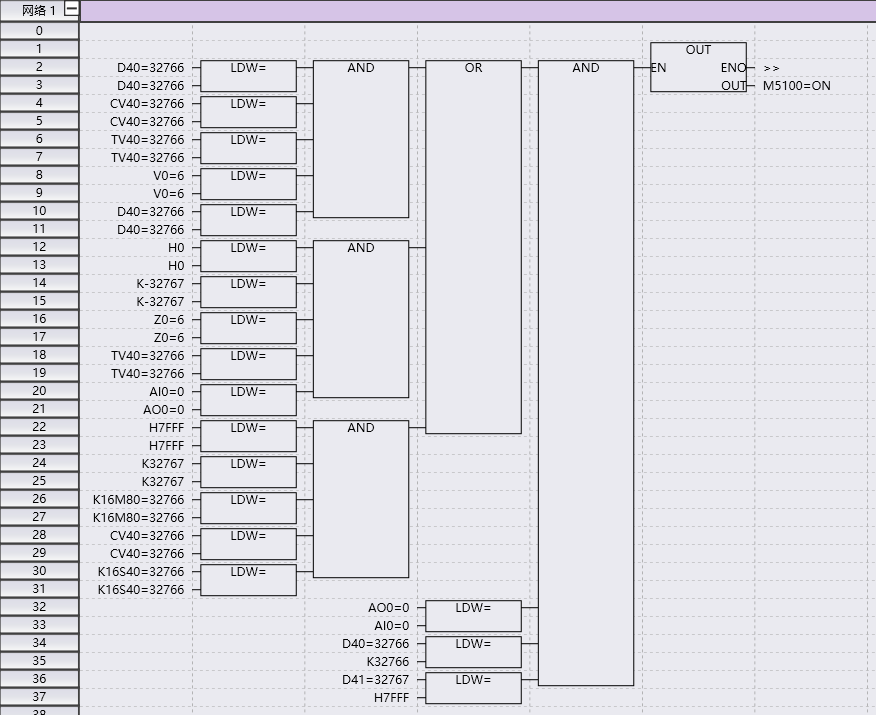
图2 Monitoring of Function Block Diagram Programs
4. Monitoring of Instruction List Programs#
The following shows the monitoring status in the instruction table program editor. Following the execution of the program, the program editor reads the visible operand data from the PLC and displays it in the editor.
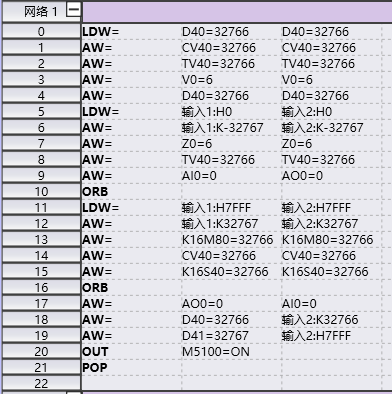
图3 Monitoring of Instruction List Programs
5. Write new values in the program editor#
Left click on the parameter component you want to operate on to display the input text box. Enter the new value and press Enter to complete the writing.
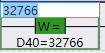
图4 write new value
Note:
Writing to the X and Y registers will automatically force. Forcing is to set a value on a software component and make it an unchangeable frozen state. If necessary, please cancel this mandatory requirement.
6. Cancel the coercion of one value (or multiple values)#
Right click on the command component to be operated, and a right-click menu will be displayed. Select 'Cancel Force'.
'Cancel all mandatory' will cancel all mandatory values.
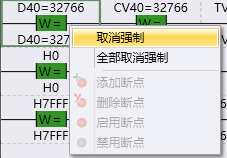
图5 cancel force
อ่านเพิ่มเติม

