


1. Monitor the status using a sequence diagram
1.1. Introduction#
You can create one or more time series charts to monitor the trend of data changes.
1.2. Open the timing diagram#
Open the timing diagram using the following method:
In the "Windows" area of the "View" menu, select "Diagram" from the "Windows" drop-down list.。
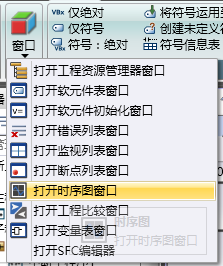
图1 Open timing diagram with menu
Refer tosequence image
อ่านเพิ่มเติม
อุปกรณ์ที่ใช้กับคู่มือนี้
2 รายการ

