


1. Write and enforce values
ในหน้านี้3 หัวข้อ
1.1. write value#
There are two ways to write values.
-
-
- Write values from the program editor** Left click on the parameter component you want to operate on to display the input text box. Enter the new value and press Enter to complete the writing.
-
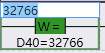
图1 Write Value from Program Editor
- Write values from the monitoring list。 Double click the parameter item and the "Set Value" column in the monitoring list to display the input text box. Enter the new value and press Enter to complete the writing.

图2 Write value from watchlist
1.2. Mandatory value#
Writing to the X and Y registers will automatically force. Forcing is to set a value on a software component and make it an unchangeable frozen state.
1.3. Cancel force#
Right click in the program editor and select "Cancel Force" to cancel the force state of the selected component parameters, or "Cancel All Force" to cancel all force states.
อ่านเพิ่มเติม
อุปกรณ์ที่ใช้กับคู่มือนี้
2 รายการ

