


Driver matching instructions for the other brand motors
Parameter settings before combination use#
When using R8 servo driver to match motors from other manufacturers, the following steps should be followed to set it up:
1.Customize motor parameter settings and enter developer mode
First, set the P00-01 parameter to 65535 and P00-14 parameter to 3605 before restarting the servo
Code | Name | Set range | unit | value | Effective Mode | Set mode | Relevant Mode |
P00-01 | Motor mode | 0~65535 | - | 0 | Stop restart | Stop set | Ordinary user |
2.Modify the following relevant parameters according to the specifications of the motor, and save the selected parameters:
Code | Name | Set range | unit | value | Effective Mode | Set mode | Relevant Mode |
P10-04 | Single cycle pulse count of motor | 1~1073741824 | p | 1 | Stop restart | Stop set | Factory mode |
P10-06 | Rated voltage | 0-220V 1-380V | -- | 0 | Stop restart | Stop set | Factory mode |
P10-07 | Rated power | 0~65535 | 10W | 75 | Stop restart | Stop set | Factory mode |
P10-08 | Rated current | 0~65535 | 0.01A | 470 | Stop restart | Stop set | Factory mode |
P10-09 | Rated torque | 0~65535 | 0.01Nm | 239 | Stop restart | Stop set | Factory mode |
P10-10 | Rated speed | 0~65535 | rpm | 3000 | Stop restart | Stop set | Factory mode |
P10-11 | Maximum torque | 0~65535 | 0.01Nm | 716 | Stop restart | Stop set | Factory mode |
P10-12 | Maximum speed | 0~65535 | rpm | 6000 | Stop restart | Stop set | Factory mode |
P10-16 | Moment of inertia | 0~65535 | kg.mm2 | 130 | Stop restart | Stop set | Factory mode |
P10-17 | Polar logarithms | 0~65535 | -- | 4 | Stop restart | Stop set | Factory mode |
P10-18 | Phase resistance | 0~65535 | mΩ | 500 | Stop restart | Stop set | Factory mode |
P10-19 | Q-axis inductance | 0~65535 | mH | 327 | Stop restart | Stop set | Factory mode |
P10-20 | D-axis inductance | 0~65535 | mH | 387 | Stop restart | Stop set | Factory mode |
P10-21 | Coefficient of back EMF | 0~65535 | 0.01mV/rpm | 3330 | Stop restart | Stop set | Factory mode |
P10-22 | Z signal corresponds to electrical angle | 0~3600 | 0.1° | 1800 | Stop restart | Stop set | Factory mode |
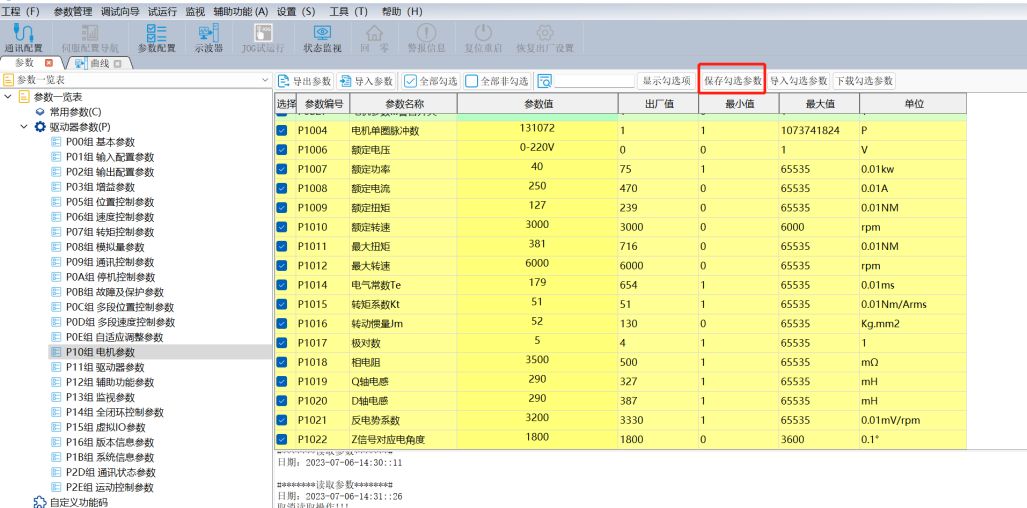
Figure 5.16 After selecting parameters, save and check the selected parameters
3.Import parameter files using the upper computer
Using the SamKoon servo software, write the motor parameters from step two into the servo, restart the servo, and re read the servo parameters to confirm successful parameter writing。
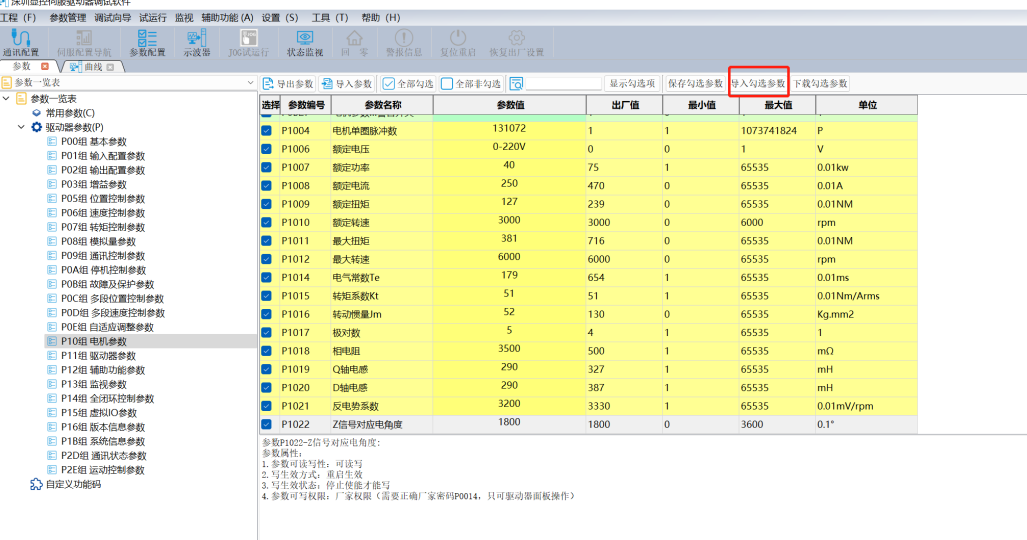
Figure 5.17 After saving the parameters, download and select the parameters
Motor encoder phase reset operation#
1. Set P00-14 to 3605 and P20-00 to 3 to lock the motor shaft
Code | Name | Set range | unit | value | Effective Mode | Set mode | Relevant Mode |
|---|---|---|---|---|---|---|---|
P00-14 | Factory password | 0~65535 | -- | 0 | Effective immediately | Set anytime | Ordinary user |
P20-00 | Motor mode set | 3-Motor shaft lock | 0 | Effective immediately | Set anytime | Ordinary user |
2.After locking the motor shaft, check the P20-06 lock shaft voltage percentage and turn the motor shaft. If it can be turned, increase the value of P20.06 and lock the motor shaft.
Code | Name | Set range | unit | value | Effective Mode | Set mode | Relevant Mode |
|---|---|---|---|---|---|---|---|
P20-06 | Lock shaft current intensity | 0~100 | -- | 30 | Effective immediately | Set anytime | Ordinary user |
3.Read the value of P13-31, calculate the difference between P13-31 and P10-22, and write the difference into P10-22.
Code | Name | Set range | unit | value | Effective Mode | Set mode | Relevant Mode |
|---|---|---|---|---|---|---|---|
P13-31 | Electrical angle | 0~3600 | 0.1° | 0 | Read only | read | Ordinary user |
P10-22 | Z signal corresponds to electrical angle | 0~3600 | 0.1° | 1800 | Stop restart | Stop set | Factory mode |
4.Set P20-00 to 0 to unlock the shaft and enter JOG mode to test if it can operate normally.
Code | Name | Set range | unit | value | Effective Mode | Set mode | Relevant Mode |
|---|---|---|---|---|---|---|---|
P20-00 | Motor mode set | 3-Motor shaft locking | 0 | Effective immediately | Stop set | Ordinary user |
อ่านเพิ่มเติม
- วัดค่า Inertia อัตโนมัติด้วย Inertia Identification (F00-03) | Samkoon Servoขั้นตอนการรัน Inertia Identification บน Samkoon R8 Servo Drive ผ่านปุ่มหน้าเครื่อง วัด Load Inertia Ratio จริงของเครื่องจักร ข้อควรระวังก่อนรัน การอ่านผล และการนำค่าไปใช้จูนระบบ
- เข้าใจ 3 Loop ของ Servo Drive | Position, Speed, Current Loopอธิบายการทำงานของ Position Loop, Speed Loop และ Current Loop ใน Servo Drive กฎการจูนทั้ง 3 วงจร โหมดควบคุมทั้ง 3 แบบ (Position / Speed / Torque) และการเลือกโหมดให้ตรงกับงาน
